Next.js Hydration Errors: How to Diagnose and Fix React Mismatches
Learn the common causes of Next.js hydration errors, how to troubleshoot React DOM mismatches, and their impact on Core Web Vitals.
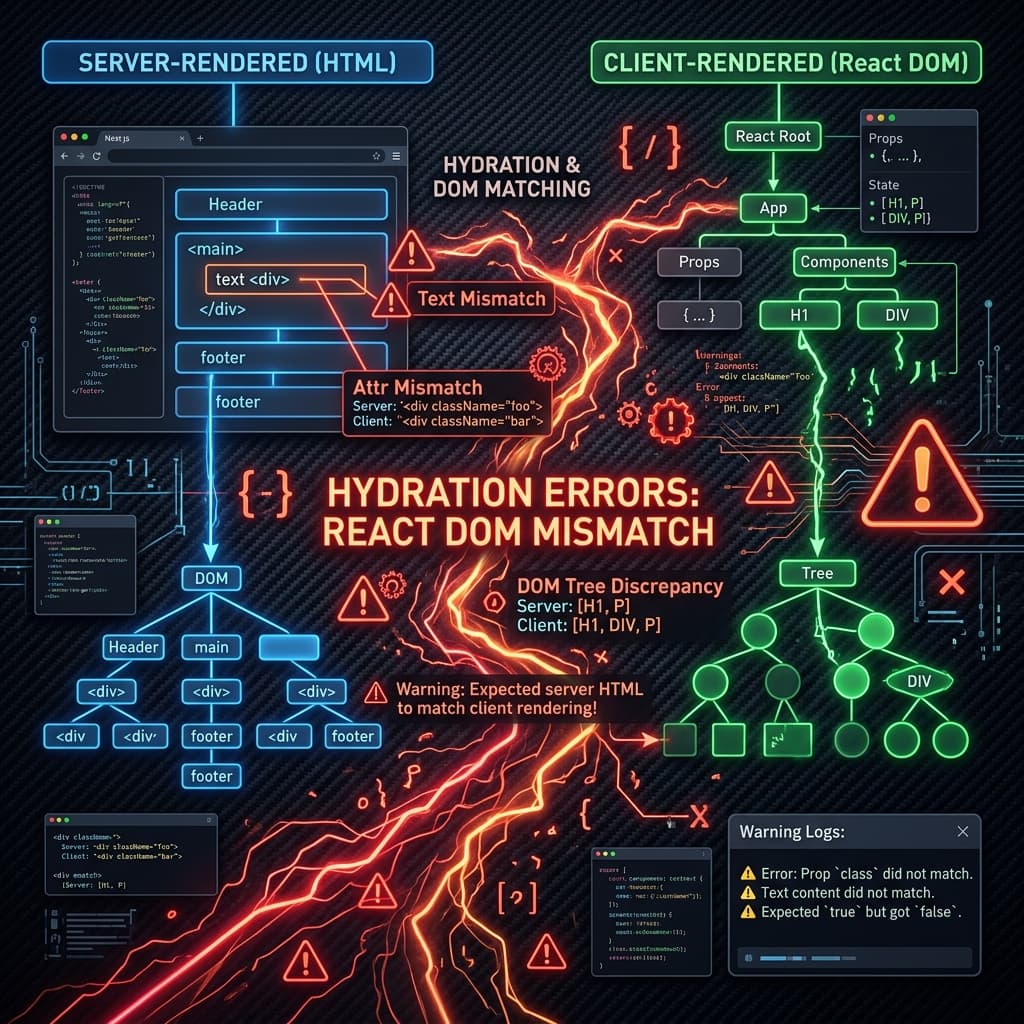
Key Takeaways
- Hydration is the process of React attaching event listeners to pre-rendered server HTML.
- A mismatch occurs if client-rendered content differs from the server-rendered HTML payload.
- Using client-side values (like window.innerWidth) during initial render triggers hydration failures.
Hydration errors are among the most common and frustrating developer-facing issues in Next.js applications. Far from being harmless console warnings, hydration mismatches can severely degrade page performance, break user interactions, and negatively impact your site's SEO.
When Next.js pre-renders a page on the server, it generates a static HTML shell to send to the browser. Once the browser receives this HTML and downloads the JavaScript bundle, React executes a process called hydration. During hydration, React traverses the existing DOM structure, verifies that the structure matches what it expects to render on the client, and attaches event listeners (like clicks and inputs) to make the page interactive.
A hydration mismatch occurs when the HTML structure or text content generated on the server differs from what React generates in the browser during the initial client-side render pass. When this happens, React has to discard part of the pre-rendered DOM, recreate the mismatched nodes from scratch, and re-insert them into the document. This process causes rendering delays, layout shifts, and CPU spikes.
1. Common Causes of Hydration Errors
Understanding why hydration mismatches happen is the key to preventing them. They typically fall into three categories:
1. Invalid HTML Tag Nesting
Web browsers have strict rules for how HTML tags can be nested. If your React JSX generates invalid HTML, the browser will automatically correct it behind the scenes before React hydrates the page. When React attempts to match its expected virtual DOM against the browser's modified DOM, a mismatch occurs. Common examples include:- →Nesting block-level elements inside inline elements (e.g., placing a
<div>inside a<p>). - →Nesting interactive elements (e.g., an
<a>tag inside another<a>tag, or a<button>inside an<a>tag). - →Table structures with missing elements, such as putting
<tr>directly inside a<table>instead of wrapping them in a<tbody>.
2. Client-Side Global Objects and API Access
Since Server-Side Rendering (SSR) executes on a Node.js server, browser-specific objects (likewindow, document, localStorage, sessionStorage, or navigator) do not exist. If you write code that reads these variables during the initial render pass, it will output empty or default values on the server but different values on the client:
// This will cause a hydration error because the server evaluates it as undefined
// while the client evaluates it to the browser's actual width.
const width = typeof window !== 'undefined' ? window.innerWidth : 1024;
3. Dynamic or State-Dependent Data
Any code that relies on real-time data, localization, or randomness can generate different results depending on where it runs:- →Dates and Times: Displaying a relative time or formatted date using the server's local system timezone instead of UTC will mismatch when a user opens the page from a different timezone.
- →Random Values: Using functions like
Math.random()to generate IDs or layout attributes. - →Localization: Serving page content based on language settings detected via browser-specific request headers that were not captured by the server.
2. Technical Impact on Performance & SEO
From a technical SEO and performance perspective, hydration failures are costly:
- Increased Total Blocking Time (TBT): Discarding the pre-rendered HTML and rebuilding the DOM on the client is CPU-intensive. It blocks the main thread, delaying the time it takes for pages to become interactive.
- Cumulative Layout Shift (CLS): If React discards and replaces a block of HTML, it often shifts nearby content down or to the side. This results in layout shifts that frustrate users and degrade your CLS score.
- Slowed Largest Contentful Paint (LCP): If the mismatch affects the LCP element (such as an hero image or a main headline block), the browser must re-render the element on the client, pushing out your LCP timing.
- SEO Indexing Discrepancies: Googlebot runs a headless browser and indexes pages based on both pre-rendered HTML and hydrated client states. Mismatches can lead to search engines indexing incorrect text content or failing to properly follow broken navigation links.
3. Recommended Code Remedies
To resolve hydration errors, choose the strategy that best fits your component's requirements.
Method A: Delaying Client-Side Rendering with useEffect
The safest and most common fix is to defer rendering client-specific parts of the component until after React has successfully completed hydration.
'use client';

import { useState, useEffect } from 'react';

export default function AdaptiveClientComponent() {
  const [isMounted, setIsMounted] = useState(false);
  const [screenSize, setScreenSize] = useState({ width: 1024, height: 768 });

  // useEffect only runs on the client after the component mounts
  useEffect(() => {
    setIsMounted(true);
    setScreenSize({
      width: window.innerWidth,
      height: window.innerHeight,
    });
  }, []);

  // During SSR and initial hydration, render a consistent placeholder skeleton
  if (!isMounted) {
    return <div className="animate-pulse bg-gray-200 h-10 w-full rounded" />;
  }

  return (
    <div className="p-4 border rounded shadow">
      <p>Your screen size is: {screenSize.width}px x {screenSize.height}px</p>
    </div>
  );
}
Method B: Disabling SSR via Dynamic Imports
If a component relies heavily on browser APIs (like an interactive map, canvas editor, or client-side charts), you can import it dynamically and disable SSR entirely.import dynamic from 'next/dynamic';
// Import the component with SSR disabled
const InteractiveChart = dynamic(
() => import('@/components/InteractiveChart'),
{ ssr: false, loading: () => <p>Loading chart data...</p> }
);
export default function AnalyticsDashboard() {
return (
<div className="dashboard-container">
<h1>Performance Report</h1>
<InteractiveChart />
</div>
);
}Method C: Using suppressHydrationWarning
For minor content mismatches that you cannot easily avoid (such as rendering timestamps or dates), you can add the suppressHydrationWarning attribute. This stops React from printing errors to the console, although it does not prevent client-side layout shifts. Use this attribute sparingly.
export default function TimestampDisplay() {
  const currentYear = new Date().getFullYear();

  return (
    <footer className="footer-links">
      {/* Suppresses warnings if local system date fluctuates slightly */}
      <p suppressHydrationWarning>© {currentYear} TechSEO Insights. All rights reserved.</p>
    </footer>
  );
}
4. Debugging Hydration Mismatches
When troubleshooting hydration errors, use the following tools:
- Inspect Chrome DevTools Console: Look for the specific DOM node mismatch. React will display a message like
Hydration failed because the initial UI does not match what was rendered on the serverand provide a diff of the expected vs. actual HTML. - Use Next.js Hydration Overlay: Tools like
@double-trouble/next-hydration-overlaywrap your application in development and display a visual side-by-side diff highlighting where the mismatch occurred. - Disable JavaScript in the Browser: If you suspect that a browser extension is injecting content (like translation text or autofill elements) and causing the error, temporarily disable JavaScript in the browser settings to see if the static server HTML displays any structural anomalies.
Technical Implementation: JSON-LD Schema
Implement this JSON-LD schema on your page:
<script type="application/ld+json">
{
  "@context": "https://schema.org",
  "@type": "TechArticle",
  "headline": "Next.js Hydration Errors: How to Diagnose and Fix React Mismatches",
  "description": "Learn the common causes of Next.js hydration errors, how to troubleshoot React DOM mismatches, and their impact on Core Web Vitals.",
  "inLanguage": "en-US",
  "mainEntityOfPage": {
    "@type": "WebPage",
    "@id": "https://www.seotech.app/blog/nextjs-hydration-errors-guide"
  },
  "image": {
    "@type": "ImageObject",
    "url": "https://www.seotech.app/images/blog/nextjs-hydration-errors-guide.png",
    "width": 1200,
    "height": 1200
  },
  "datePublished": "2026-07-06T10:00:00Z",
  "dateModified": "2026-07-06T10:00:00Z",
  "author": {
    "@type": "Person",
    "name": "TechSEO Editorial Team",
    "url": "https://www.seotech.app/authors/techseo-editorial-team"
  },
  "publisher": {
    "@type": "Organization",
    "name": "TechSEO Insights",
    "url": "https://www.seotech.app",
    "logo": {
      "@type": "ImageObject",
      "url": "https://www.seotech.app/images/logos/logo.svg"
    }
  }
}
</script>
Official References
Frequently Asked Questions
Do hydration errors affect Core Web Vitals?
Yes, hydration errors can cause layout shifts (CLS), increase Total Blocking Time (TBT), and slow down Largest Contentful Paint (LCP) as React rebuilds the DOM.
Can browser extensions trigger Next.js hydration errors?
Yes. Extensions that modify the DOM, such as password managers, translation tools, or ad blockers, can insert nodes before React hydrates, resulting in mismatch errors.
What is the difference between suppressHydrationWarning and dynamic imports?
suppressHydrationWarning ignores minor text mismatches (like timestamps) but doesn't prevent hydration. Next.js dynamic() with { ssr: false } completely skips server-side rendering for that component.

Founder & Editor, TechSEO Insights
The TechSEO Editorial Team writes practical SEO, AI tools, and web development guides based on hands-on research, testing, and real website optimization work.
Subscribe to TechSEO Insights
Get the latest guides on technical SEO, Core Web Vitals, and content marketing delivered straight to your inbox.
Privacy Note: By subscribing, you agree to receive our newsletter (Lawful Basis: Consent). We retain your email address until you choose to unsubscribe. For more details, view our Privacy Policy.