Attribution Modeling for SEO: How to Prove Organic Traffic Value
Master data-driven, first-touch, and last-touch attribution models in Google Analytics 4 to measure and demonstrate organic conversion value.
Key Takeaways
- Attribution modeling assigns conversion credit across a user's multi-touch journey.
- First-touch models highlight top-of-funnel SEO discovery keywords.
- Last-touch models over-index on closing search paths, underestimating SEO's impact.
SEO campaigns are frequently undervalued in executive budget discussions because traditional reporting models rely on Last-Click Attribution. Under a last-click setup, 100% of the conversion credit goes to the final channel the user interacted with before converting.
Because organic search often acts as a top-of-funnel discovery channel, a B2B buyer might find your site via a technical blog post, return a week later via a retargeting ad, and finally convert by typing your brand name directly into Google. If your analytics engine uses a last-click model, Organic Search receives zero conversion credit, and the value of your SEO work goes unrecorded.
To prove the true ROI of your content, you must master multi-touch attribution modeling.
1. Comparing Marketing Attribution Models
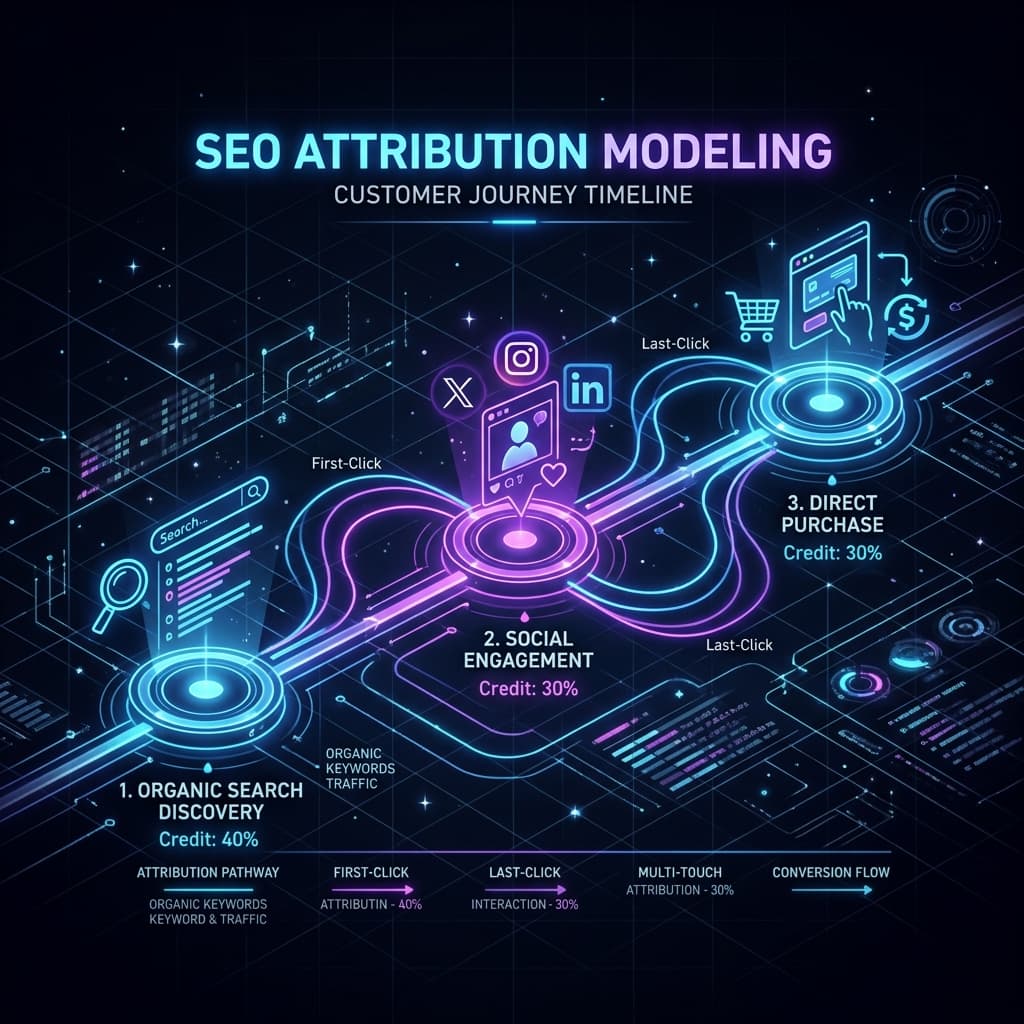
Attribution models determine how conversion credit is distributed across all the touchpoints in a user's journey.
graph LR
    FirstTouch["1. Organic Search<br/>(Discovery)"] --> MiddleTouch["2. Email Newsletter<br/>(Nurture)"]
    MiddleTouch --> LastTouch["3. Direct / Brand Search<br/>(Conversion)"]
Depending on the model you select, the conversion credit for the above journey is allocated differently:
First-Touch Attribution
This model assigns 100% of the conversion credit to the first touchpoint in the journey (in this case, Organic Search).- →SEO Advantage: Excellent for proving the value of top-of-funnel content and informational blog posts that drive initial brand awareness.
- →Limitation: Ignores all subsequent nurturing channels that helped close the lead.
Last-Touch Attribution
This model assigns 100% of the conversion credit to the final interaction before the purchase (in this case, Direct).- →SEO Disadvantage: Severely undervalues SEO, as organic search rarely serves as the final step in complex B2B buying cycles.
Linear Attribution
This model distributes conversion credit equally across all touchpoints (33.3% to Organic Search, 33.3% to Email, and 33.3% to Direct).- →SEO Advantage: Recognizes the contribution of every channel in the conversion pipeline.
Position-Based (U-Shaped) Attribution
This model assigns 40% of the credit to the first touchpoint, 40% to the last touchpoint, and distributes the remaining 20% across all middle interactions.- →SEO Advantage: Highlights both the discovery channel (typically SEO) and the closing channel.
Data-Driven Attribution (DDA)
Google Analytics 4's default model uses machine learning to evaluate both converting and non-converting user paths. DDA calculates how much probability a specific channel adds to the conversion chance, assigning fractional credits to each channel algorithmically.2. Accessing and Configuring Attribution in GA4
To analyze your organic search impact using multi-touch models in GA4:
- Navigate to your Google Analytics 4 property.
- Click on the Advertising icon in the left-hand navigation sidebar.
- Under Attribution, select the Conversion Paths report.
- Use the Reporting attribution model dropdown to toggle between Data-driven, Last-click, and First-click to see how credit values shift.
Measuring SEO Value with Paid Search Equivalence
To translate organic conversions into financial values that business executives understand, calculate the Paid Search Equivalence Value:$$\text{SEO Value} = \text{Organic Clicks} \times \text{Equivalent Google Ads CPC}$$
For example, if your technical blog post ranks #1 for "React hydration errors" and drives 5,000 organic clicks per month, and the corresponding keyword bid on Google Ads (CPC) is \$4.50, that single page generates \$22,500 in equivalent monthly ad spend value.
3. SQL Querying for SEO Attribution via BigQuery
For advanced analytics teams, the default GA4 interface can be limiting. By exporting your GA4 raw event data to Google BigQuery, you can run custom SQL queries to reconstruct user paths and calculate first-touch organic traffic sources directly.
Here is an example SQL script to identify the first-touch source for converting user sessions:
WITH user_touchpoints AS (
  -- Gather all event touchpoints for each user session
  SELECT
    user_pseudo_id,
    event_timestamp,
    event_name,
    (SELECT value.string_value FROM UNNEST(event_params) WHERE key = 'page_location') AS page_url,
    (SELECT value.string_value FROM UNNEST(event_params) WHERE key = 'medium') AS traffic_medium,
    (SELECT value.string_value FROM UNNEST(event_params) WHERE key = 'source') AS traffic_source,
    -- Rank events chronologically per user
    ROW_NUMBER() OVER (PARTITION BY user_pseudo_id ORDER BY event_timestamp ASC) AS touchpoint_rank
  FROM
    `your-gcp-project.analytics_123456789.events_*`
  WHERE
    _TABLE_SUFFIX BETWEEN '20260601' AND '20260706'
)

SELECT
  traffic_source,
  traffic_medium,
  COUNT(DISTINCT user_pseudo_id) AS total_converting_users
FROM
  user_touchpoints
WHERE
  -- Filter by the first action the user ever performed
  touchpoint_rank = 1
  -- Check if they went on to complete a purchase/conversion event
  AND user_pseudo_id IN (
    SELECT DISTINCT user_pseudo_id
    FROM `your-gcp-project.analytics_123456789.events_*`
    WHERE event_name = 'purchase' OR event_name = 'lead_conversion'
  )
GROUP BY
  traffic_source,
  traffic_medium
ORDER BY
  total_converting_users DESC;
Official References
Frequently Asked Questions
Which attribution model is best for SEO?
Data-driven attribution (DDA) is ideal, as it uses machine learning to assign fractional conversion credit based on path probability.
Why does last-click attribution hurt SEO budget discussions?
Last-click models ignore the channel that introduced the user to the brand. If a user discovers you via an organic guide, signs up to a newsletter, and later converts via a Google Ad, Last-Click gives 100% of the credit to Paid Search.
How can I view multi-touch SEO paths in Google Analytics 4?
Navigate to the Advertising workspace in GA4 and select the 'Conversion Paths' report under Attribution to view multi-touch user journeys.
How do I configure custom attribution in GA4?
In GA4, go to Admin > Data Display > Attribution Settings. You can choose your reporting attribution model, such as data-driven or last-click.
What is data-driven attribution?
Data-driven attribution uses machine learning algorithms to distribute conversion credit across all touchpoints based on how users interact with your brand.
Why does Google Search Console data differ from GA4?
GSC tracks impressions and clicks directly from the search engine. GA4 tracks user sessions, meaning it registers organic visits, page views, and post-click events.

Founder & Editor, TechSEO Insights
The TechSEO Editorial Team writes practical SEO, AI tools, and web development guides based on hands-on research, testing, and real website optimization work.
Subscribe to TechSEO Insights
Get the latest guides on technical SEO, Core Web Vitals, and content marketing delivered straight to your inbox.
Privacy Note: By subscribing, you agree to receive our newsletter (Lawful Basis: Consent). We retain your email address until you choose to unsubscribe. For more details, view our Privacy Policy.