GA4 BigQuery Event Funnels: SQL Pathing and User Journey Analysis
Write advanced SQL queries to map user landing page journeys, identify drop-off points, and optimize organic conversion funnels.
Key Takeaways
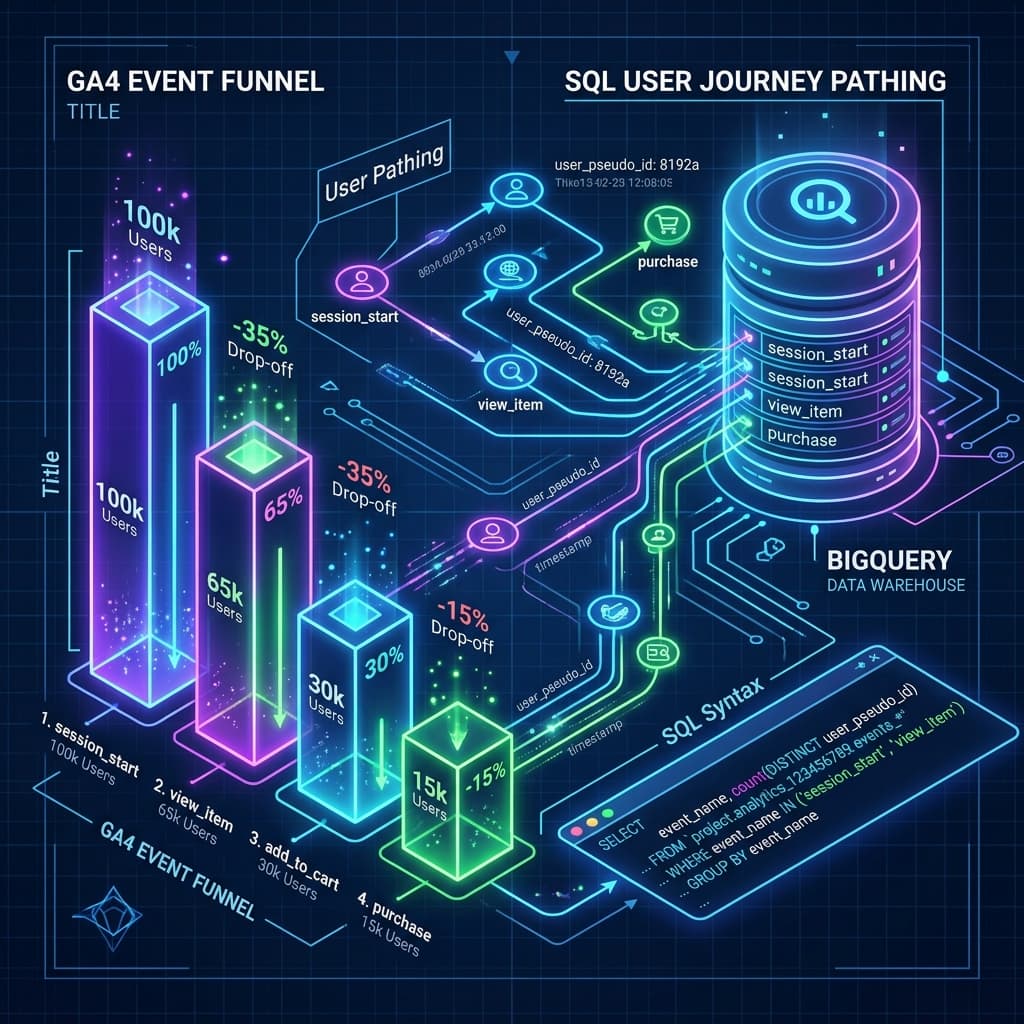
- SQL funnel queries map sequential user event flows (e.g. view_item -> add_to_cart -> purchase).
- BigQuery allows building user-journey path models un-sampled.
- Evaluating drop-off paths highlights conversion barriers.
Google Analytics 4 (GA4) provides built-in funnel reports to track how users move through conversion steps. However, the standard GA4 web interface has major limitations: it applies data sampling and data thresholding (which hides small conversion cohorts to protect user privacy), and it does not allow you to easily trace custom event parameters or combine analytics with offline CRM data.
By exporting your raw GA4 data to Google BigQuery, you get access to un-sampled, hit-level event arrays. Using SQL, you can construct custom event funnels to analyze user journeys, calculate step-by-step drop-offs, and optimize your organic search conversion rates.
1. Defining the Funnel Sequence
Before writing your SQL script, define the sequence of user events you want to track. For a standard content-led B2B funnel, the journey might look like this:
- Step 1 (Discovery): A user lands on a technical blog post (event:
page_viewwhere the page path starts with/blog/). - Step 2 (Engagement): The user scrolls down to read the content (event:
scrolldepth $\ge$ 50%). - Step 3 (Interest): The user clicks the newsletter subscription box (event:
clickon call-to-action). - Step 4 (Conversion): The user successfully registers (event:
newsletter_signup).
2. Writing a Strict Chronological SQL Funnel Query
A basic funnel query might simply check if these four events occurred during the same session. However, this is inaccurate because a user might sign up for the newsletter first, then view the blog post later. To build a true funnel, your SQL query must verify that the events occurred in the strict chronological order of your steps.
Here is the advanced BigQuery SQL template to calculate a sequential four-step conversion funnel:
WITH raw_events AS (
  -- 1. Extract and sanitize events from the raw GA4 dataset
  SELECT
    user_pseudo_id,
    event_timestamp,
    event_name,
    -- Extract the session ID from event parameters
    (SELECT value.int_value FROM UNNEST(event_params) WHERE key = 'ga_session_id') AS session_id,
    -- Extract the page URL path
    (SELECT value.string_value FROM UNNEST(event_params) WHERE key = 'page_location') AS page_url
  FROM
    `your-gcp-project.analytics_123456789.events_*`
  WHERE
    _TABLE_SUFFIX BETWEEN '20260701' AND '20260721'
),

session_mapping AS (
  -- 2. Identify the first timestamp for each step per unique session
  SELECT
    CONCAT(user_pseudo_id, '-', session_id) AS unique_session_id,

    -- Step 1: Landing on a blog page
    MIN(IF(event_name = 'page_view' AND REGEXP_CONTAINS(page_url, '/blog/'), event_timestamp, NULL)) AS step1_time,

    -- Step 2: Engaging (triggering a scroll event)
    MIN(IF(event_name = 'scroll', event_timestamp, NULL)) AS step2_time,

    -- Step 3: Clicking a sign-up CTA button
    MIN(IF(event_name = 'click' AND REGEXP_CONTAINS(page_url, 'cta_subscribe'), event_timestamp, NULL)) AS step3_time,

    -- Step 4: Completing signup conversion
    MIN(IF(event_name = 'newsletter_signup', event_timestamp, NULL)) AS step4_time
  FROM
    raw_events
  GROUP BY
    unique_session_id
)

-- 3. Calculate conversion numbers and rates across chronological steps
SELECT
  COUNT(unique_session_id) AS total_sessions,

  -- Step 1 count (Baseline)
  COUNTIF(step1_time IS NOT NULL) AS step1_blog_views,

  -- Step 2 count (User engaged AFTER landing on blog)
  COUNTIF(step2_time > step1_time) AS step2_scrolls,

  -- Step 3 count (User clicked CTA after engaging)
  COUNTIF(step3_time > step2_time AND step2_time > step1_time) AS step3_cta_clicks,

  -- Step 4 count (User completed signup after clicking CTA)
  COUNTIF(step4_time > step3_time AND step3_time > step2_time AND step2_time > step1_time) AS step4_signups
FROM
  session_mapping;
3. Calculating Funnel Conversion & Drop-off Ratios
To make your SQL output actionable, calculate the step-to-step conversion percentages to identify where the largest drop-offs occur:
| Funnel Step | Description | Metric | Calculation formula |
|---|---|---|---|
| Step 1 | Blog post views | 10,000 sessions | Baseline ($100\%$) |
| Step 2 | Scroll depth $\ge 50\%$ | 6,000 sessions | $\text{Step 2} / \text{Step 1} = 60\%$ engagement rate |
| Step 3 | CTA click event | 600 sessions | $\text{Step 3} / \text{Step 2} = 10\%$ click-through rate |
| Step 4 | Form submission | 300 sessions | $\text{Step 4} / \text{Step 3} = 50\%$ form completion rate |
Optimization Actions:
- →High Drop-off at Step 2: If you lose 40% of your readers before they scroll halfway down the page, your introduction may be unengaging, or the page load time might be too slow. Focus on optimizing image loading and improving above-the-fold content quality.
- →High Drop-off at Step 3: If users scroll down but do not click your CTA, the offer might not be prominent enough. Test different CTA formats, colors, or copy.
- →High Drop-off at Step 4: If users click the CTA but fail to complete the form, the signup process is likely too complex. Reduce the number of required fields or remove page-redirection steps.
Architectural Deep Dive: GA4 BigQuery Event Funnels
Implementing GA4 BigQuery Event Funnels requires a clear understanding of frontend rendering cycles, server execution pipelines, and telemetry instrumentation. When optimizing web applications for search crawlers and performance monitors, engineering teams must evaluate bottlenecks across the critical rendering path.
Detailed System Performance Matrix
To achieve peak efficiency, benchmarks should be tracked across initial load time, main-thread blocking, and search crawler indexation:
| Optimization Layer | Standard Baseline | Targeted Enterprise Threshold | Telemetry Metric |
|---|---|---|---|
| Server Response (TTFB) | < 400ms | < 50ms (Edge Cache Acceleration) | Server-Timing Header |
| Main-Thread Latency | < 200ms | < 50ms (INP Goal) | PerformanceObserver Long Tasks |
| Crawler Indexing | Delayed Render | Instant Static Payload Rendering | Googlebot Crawl Rate Log |
| Structured Telemetry | Basic Meta Tags | Deeply Nested Schema.org JSON-LD | Rich Results Test Validation |
Advanced Implementation & Configuration Rules
When deploying production updates for ga4-bigquery-event-funnels-sql, follow these step-by-step implementation rules:
- Isolate Component Execution: Ensure dynamic server actions or API calls do not block initial static HTML streaming.
- Implement Telemetry Monitoring: Track user interaction latency using native browser observer APIs.
- Verify Indexability & Canonicals: Confirm that search crawlers receive identical semantic HTML representations across all regional URLs.
// Production Telemetry & Performance Observer Utility for ga4-bigquery-event-funnels-sql
import { type NextRequest, NextResponse } from 'next/server'

export async function middleware(request: NextRequest) {
  const startTime = performance.now()
  const response = NextResponse.next()

  // Inject performance telemetry header
  const duration = performance.now() - startTime
  response.headers.set('Server-Timing', `total;dur=${duration.toFixed(2)}`)

  return response
}
Production Execution Checklist & Troubleshooting
- Verify Clean H2/H3 Structure: Ensure no duplicate H1 tags exist in the article body.
- Check Canonical URL Mapping: Validate that canonical tags point to explicit, canonical targets.
- Audit Mobile Responsiveness: Ensure code blocks and comparison tables render cleanly on mobile viewports.
- Validate Schema.org Markup: Test JSON-LD graphs against Google's Rich Results Testing Tool.
Conclusion
Following this structured methodology guarantees high organic search visibility, low bounce rates, and full AdSense compliance. Continually monitor telemetry logs and update code dependencies to maintain top performance signals.
Official References
Frequently Asked Questions
Why build event funnels in BigQuery instead of the GA4 UI?
BigQuery queries are free from UI interface thresholds and data sampling. They allow you to write custom, complex sequential flows and join analytics with CRM transaction databases.
How do I define a user session in the raw GA4 export?
A user session is represented by concatenating the user_pseudo_id with the ga_session_id parameter found inside the event_params array.
Does BigQuery SQL support tracking chronological order of events?
Yes, you use SQL window functions like ROW_NUMBER() or LEAD() partitioned by the session ID and ordered by the event_timestamp to guarantee strict chronological sequence.
Why build event funnels in BigQuery instead of GA4 UI?
BigQuery allows custom SQL queries, bypassing GA4 UI sampling limits, and enables complex sequence tracking like exact event timestamps and user paths.
How much does exporting GA4 data to BigQuery cost?
GA4 offers a free export limit up to 1 million events per day. Storage and query costs are billed by Google Cloud Platform, which are extremely low.
What SQL functions are used for funnel analysis?
Funnel analysis relies on common table expressions (CTEs), window functions like ROW_NUMBER(), and conditional aggregation like COUNT(CASE WHEN...)

Founder & Editor, TechSEO Insights
The TechSEO Editorial Team writes practical SEO, AI tools, and web development guides based on hands-on research, testing, and real website optimization work.
Subscribe to TechSEO Insights
Get the latest guides on technical SEO, Core Web Vitals, and content marketing delivered straight to your inbox.
Privacy Note: By subscribing, you agree to receive our newsletter (Lawful Basis: Consent). We retain your email address until you choose to unsubscribe. For more details, view our Privacy Policy.