Google Discover SEO: How to Earn Discovery Traffic Without Chasing Keywords (2026)
Learn how to optimize content for the Google Discover feed. Understand visual requirements, CTR optimization, E-E-A-T trust signals, and mobile experience.

Key Takeaways
- Google Discover is queryless, delivering personalized content to users based on their search history and interest graphs.
- Implementing high-resolution images (minimum 1200px wide) combined with the max-image-preview:large tag is required for Discover eligibility.
- Strong author authority and E-E-A-T signals are critical, as Discover filters out anonymous or low-trust content sources.
- Volatility is a core characteristic of Discover traffic, requiring publishers to build diverse organic search acquisition channels.
Most search engine optimization strategies focus on query matching: a user types a query, and you optimize a page to rank for that keyword. However, one of the largest drivers of organic traffic in 2026 requires no search queries. This platform is Google Discover.
Google Discover is a personalized, feed-based system built into Google’s mobile apps and homepage. Instead of waiting for users to search, Discover uses Google’s AI systems to deliver content directly to users based on their interests and search history. For publishers, media sites, and content portals, Discover can drive millions of sessions in days.
This guide outlines a strategy for Google Discover SEO. We will review how Discover’s algorithms work, outline key ranking factors, detail image and headline optimization workflows, and provide a diagnostic plan for recovering lost traffic.
[!NOTE] Discover optimization relies on strong technical foundations and a mobile-friendly site layout. Before optimizing templates, review our Technical SEO Audit Checklist and Core Web Vitals Optimization Guide to resolve issues that could block crawlers.
1. What Is Google Discover?
Google Discover is a queryless feed that suggests articles, videos, and news stories to users on mobile devices. It is integrated directly into:
- →The Google app on iOS and Android.
- →Google Chrome's homepage on mobile devices.
- →The default home screen swipe menu on many Android devices.
2. Discover vs Traditional Search
To optimize for Discover, you must understand how it differs from standard organic search:
Discover vs Search Comparison
| Feature | Traditional Search | Google Discover |
|---|---|---|
| User Intent | Active (pull-based via query search) | Passive (push-based based on interest feed) |
| Query Needed | Yes (explicit keyword query entered) | No (automatically served to user feed) |
| Traffic Stability | Consistent, predictable, and evergreen | Highly volatile (often spikes and falls) |
| Core Ranking Signals | Page relevance, links, technical structure | User interest match, E-E-A-T, click CTR, images |
| Content Formats | Blog posts, tools, collections, products | News, trending topics, listicles, visual blogs |
3. How Google Discover Works
Google Discover uses the Google Topic Graph, an AI database mapping relationships between entities, topics, and user interests.
       [ User Search History & App Activity ]
                         │
                         ▼
        [ Google Topic Graph Engine ]
                         │ (Maps interests to entities)
                         ▼
[ Filter Content Corpus (E-E-A-T / High-Res Images) ]
                         │
                         ▼
   [ Personalized Mobile Feed Recommendations ]
When a user interacts with search, maps, or YouTube, Google updates their interest profile. The Discover engine then filters its index for high-quality content that matches these interests, prioritizing articles that are trending or relevant to their browsing history.
4. Types of Content That Perform Well in Discover
While Google Discover can recommend evergreen guides, it typically favors visual, engaging, and timely content.
High Performing Content Types
| Content Category | Performance Type | Primary Driver | Example Scenario |
|---|---|---|---|
| Trending News | Short-term spikes | Publications on immediate breaking events | Real-time reporting on new industry announcements |
| Evergreen Advice | Long-term distribution | High interest, timeless guide topics | Detailed walkthroughs of core industry fundamentals |
| Opinion & Analysis | High CTR engagement | Contrarian thoughts, industry analyses | Deep expert breakdown of search trends |
| Lifestyle & Hobbies | High visual appeal | Hobbyist content, listicles, visual lists | Curated resource lists, product tutorials |
5. Discover Ranking Signals
Google Discover does not use backlinks or keyword density as primary ranking signals. Instead, it prioritizes:
Discover Ranking Signals
| Signal Name | Weight | Primary Metric Group | Optimization Target |
|---|---|---|---|
| E-E-A-T & Authority | Critical | Creator reputation & trustworthiness | Author bios, transparency page, peer verification |
| Visual Appeal (CTR) | Critical | High-resolution image size and style | Minimum 1200px width, max-image-preview:large |
| Freshness & Interest | High | Publication date and user interest match | Real-time trending topics, breaking reports |
| Page Experience | High | Mobile compliance & Core Web Vitals | LCP < 2.5s, mobile responsive styling |
6. Large Images Best Practices
The most common reason sites are excluded from Google Discover is failing to meet image requirements. Google uses large card previews in the Discover feed. If your images do not meet the minimum dimensions, Google will display a small thumbnail instead, which can reduce your click-through rate by up to 80%.
Image Requirements Checklist
- →Image Width: Ensure featured images are at least 1,200 pixels wide.
- →Robots Meta Tag: Include the
max-image-preview:largedirective in your page header. This allows Google to show the large image layout in the feed. - →Aspect Ratio: Use standard landscape layouts (e.g., 16:9, 4:3) to prevent crop issues in the mobile app card view.
- →Optimize File Sizes: Compress images using modern formats (e.g., WebP or AVIF) to ensure fast load times on mobile connections.
<!-- Required header configuration for Google Discover image display -->
<meta name="robots" content="max-image-preview:large">
For Next.js applications, configure your metadata in layout.tsx or page.tsx as follows:
// Next.js Metadata setup for max-image-preview large cards
import type { Metadata } from 'next';

export const metadata: Metadata = {
  robots: {
    index: true,
    follow: true,
    googleBot: {
      index: true,
      follow: true,
      'max-image-preview': 'large',
    },
  },
};
7. Mobile Experience Optimization
Google Discover is a mobile-first platform. If your website has mobile usability issues or slow load times, it will struggle to gain visibility.
- →Check Responsive Design: Ensure page layouts adjust smoothly to different mobile viewports. Check that buttons are large enough to tap easily and text sizes are comfortable to read.
- →Pass Core Web Vitals: Focus on metrics like Largest Contentful Paint (LCP) and Cumulative Layout Shift (CLS). You can find troubleshooting tips in our Core Web Vitals Optimization Guide.
- →Remove Interstitial Ads: Google flags intrusive pop-ups and large ads that block main content, as they hurt user experience.
- →Avoid Layout Shifts: Ensure images, scripts, and fonts have defined dimensions to prevent content from shifting as it loads.
8. Author Authority & E-E-A-T
Google Discover requires high levels of Experience, Expertise, Authoritativeness, and Trustworthiness (E-E-A-T). Discover's algorithm filters out low-trust content sources to maintain feed quality.
- →Provide Author Biographies: Include an author bio card on every article, detailing their credentials, experience, and links to professional profiles or social media.
- →Add Schema Markup: Use
Personschema for authors andOrganizationschema for the publisher. This helps Google associate your content with recognized entities. For details on structured data, check our Structured Data & Schema Markup Guide. - →Maintain Editorial Transparency: Publish clear editorial policies, fact-checking policies, and author correction guidelines.
- →Manage AI Content Carefully: If you use AI to support content scaling, make sure it is reviewed and edited by human experts. Refer to our AI SEO Content Writing Guide to align your content with helpful content guidelines.
9. Headline Optimization for Discover
Discover headlines should capture interest without crossing into clickbait. Headlines that mislead users or exaggerate claims will eventually be filtered out by Google's spam filters.
Headline Optimization Examples
| Focus Area | Bad Headline (Non-Discover) | Good Headline (Discover) | Primary Optimization Action |
|---|---|---|---|
| Engagement Focus | How to Configure Server Access Logs | What Your Server Logs Reveal About Search Crawler Waste | Add descriptive value hooks without clickbait |
| SEO Automation | GSC API Documentation Overview | Why SEO Teams Are Automating GSC Reporting with the API | Connect technical methods with real-world motivations |
| Core Web Vitals | A Guide to Improving Page Speed | How Slow Layout Shifts Are Quietly Ruining E-Commerce Conversions | Frame issues around business cost or user friction |
10. Content Freshness Signals
Discover values fresh content. Implementing a strategy to capture trending topics is key to earning feed placements:
- →Monitor Trending Topics: Use Google Trends, Google Search Console, and social monitoring tools to identify rising queries in your niche.
- →Add Real-Time Context: When writing about industry news, explain how the event impacts users and what changes they should expect.
- →Refresh Evergreen Content: Keep your evergreen guides updated with the latest data, charts, and advice. A updated publish date on a refreshed article can prompt Google to re-evaluate it for the Discover feed.
- →Set Up Dynamic Feeds: Create and maintain updated RSS and XML sitemaps to ensure search engines crawl and index new content quickly.
11. Discover Performance Tracking
You can track your Discover performance using the dedicated report in Google Search Console:
- →Check the Discover Tab: GSC displays a "Discover" report under the Performance tab once your site reaches minimum traffic thresholds.
- →Analyze CTR Performance: Discover CTRs are often higher than standard search CTRs due to the visual card layout. Analyze which images and headline patterns drive the highest click-through rates.
- →Segment Data in GA4: Because Discover traffic lands directly on your pages, it is often grouped under "google / organic" or "direct" traffic in analytics. To track it accurately, correlate GSC Discover traffic spikes with specific landing page activity in GA4. Refer to our Google Analytics 4 Guide to set up custom segments.
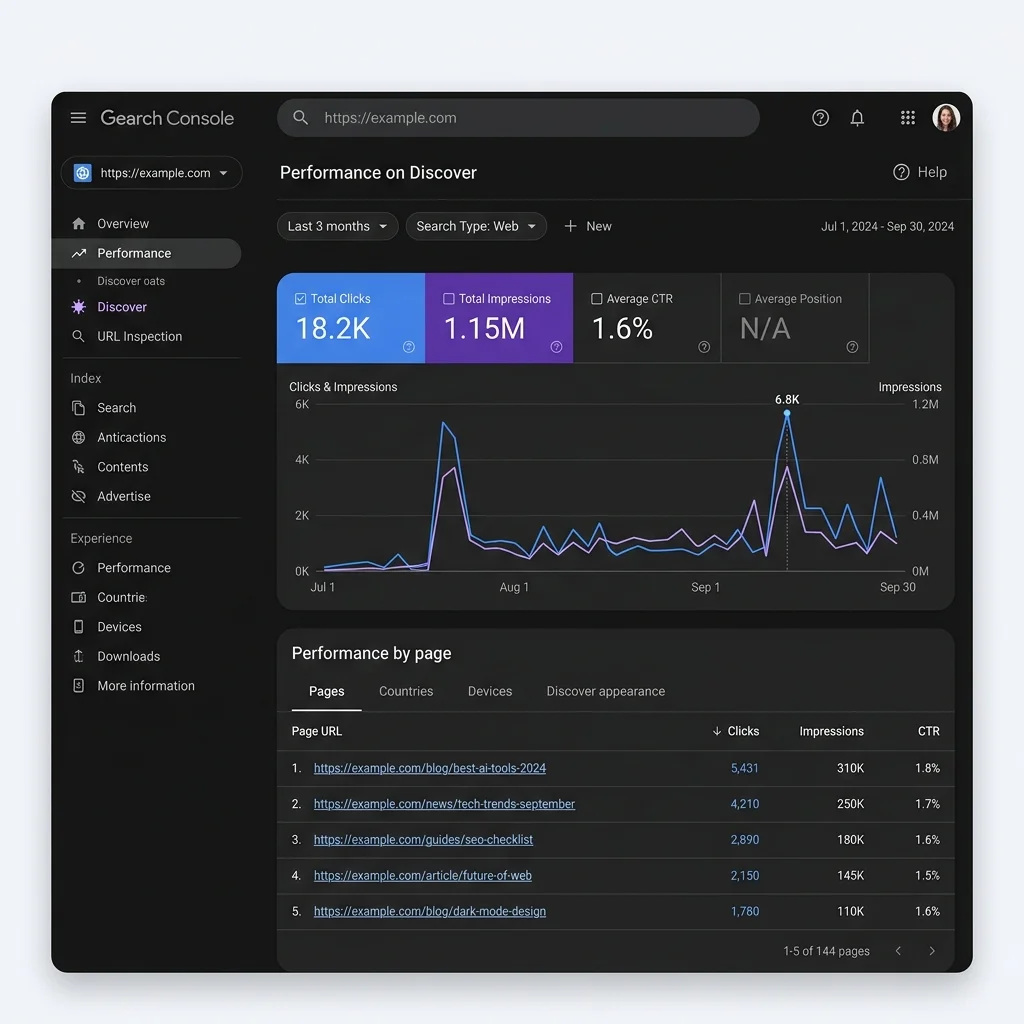
12. Recovering Lost Discover Traffic
Because Discover traffic relies on interest graphs, it can be highly volatile. Spikes can be followed by sharp drops. If your Discover traffic falls, follow this recovery workflow:
flowchart TD
    A[Detect Discover Traffic Drop] --> B[Check Google Search Status Dashboard]
    B --> C{Are there system outages or core updates?}
    C -- Yes --> D[Wait for update completion / Audit site alignment]
    C -- No --> E[Crawl Site for Technical Bottlenecks]
    E --> F{Check mobile speed and index tags}
    F -- Issues Found --> G[Fix Core Web Vitals, Robots, and Image tags]
    F -- Clean --> H[Audit E-E-A-T and helpful content signals]
H --> I[Update author bios, fact-checks, and refresh content]- →Verify Technical Health: Confirm the
max-image-preview:largerobots tag is still present and check for server errors in GSC. - →Audit Content Quality: Compare recent posts against helpful content guidelines. Look for clickbait headlines or thin content that could have triggered an algorithmic filter.
- →Check for Manual Actions: Review the Security & Manual Actions tab in GSC to ensure your site has not violated search policies.
- →Review Core Updates: Google core updates often adjust interest graph algorithms. If a drop aligns with an update, review your overall site quality and authority signals.
13. Common Discover Traffic Mistakes
Avoid these common optimization mistakes:
- →Using Clickbait Headlines: Creating misleading titles may win clicks short-term but will eventually trigger algorithmic filters.
- →Failing to Meet Image Requirements: Uploading small images or omitting preview metadata will exclude your pages from large card views.
- →Ignoring Mobile Speed: Slow mobile page speeds will limit your distribution in mobile feeds.
- →Lacking Author Transparency: Omitting author bios or using generic aliases reduces E-E-A-T signals.
- →Neglecting Internal Links: A flat site architecture helps crawlers find and index content quickly. Review our Programmatic SEO Guide to build clean internal link structures.
14. Discover Traffic Audit Checklist
Use this checklist to audit your pages for Google Discover eligibility:
Discover Traffic Audit Checklist
- Image Dimensions: Verify featured images are at least 1200px wide.
- Preview Meta Tag: Confirm the
max-image-preview:largetag is present in the HTML head. - Mobile Compliance: Check page layouts against mobile-friendly standards.
- Lighthouse Performance: Ensure LCP is under 2.5s and CLS is under 0.1.
- Author Schema: Verify that page schemas include structured author profiles.
- E-E-A-T Elements: Add detailed author bios and editorial transparency statements.
- Headline Check: Review headlines to ensure they are descriptive and not clickbait.
- Data Monitoring: Set up tracking in GSC to monitor Discover click and impression data.
15. Common Mistakes & Fixes
| Common Error | Discover Impact | Direct Correction / Fix |
|---|---|---|
| Clickbait Headlines | Temporary traffic spike followed by algorithmic filter | Use descriptive, accurate headlines; avoid misleading phrases |
| Small Featured Images | Excluded from visual cards, CTR collapses | Ensure featured image is 1200px wide and served via max-image-preview:large |
| Weak Author Profiles | Lower E-E-A-T trust signals, reduced reach | Create detailed author bio pages; link to social profiles and wikis |
| Poor Mobile UX | Reduced distribution due to page experience penalty | Optimize templates for Core Web Vitals; remove layout shifts |
16. References
Frequently Asked Questions
What is Google Discover?
Google Discover is a mobile feed that automatically serves personalized content to users based on their web activity, search history, and topics they choose to follow, without requiring a keyword query.
What are the image requirements for Google Discover?
Featured images must be at least 1,200 pixels wide. You must also include the 'max-image-preview:large' meta robots tag in your HTML header to allow Google to display the image in the large card layout.
Why did my Google Discover traffic drop?
Discover traffic is volatile. Drops are often caused by changes in Google's interest graph algorithms, technical issues like slow mobile page speeds, missing metadata, or updates to Google's helpful content systems.

Technical SEO Specialist & Web Performance Engineer
Daniel Ashcroft is a Technical SEO Specialist with 9+ years of experience optimizing enterprise web applications for search performance. He specializes in Next.js architecture, Core Web Vitals, and technical SEO implementations that bridge development and marketing. He has led SEO migrations for Fortune 500 companies, managed crawl optimization for million-page sites, and built automated auditing tools used by agencies worldwide. Daniel has helped clients achieve 40%+ organic traffic improvements through JavaScript SEO, server-side rendering, and performance optimization. He is a regular speaker at BrightonSEO, SMX, and SearchLove, contributing to publications including Search Engine Land and Moz Blog. Daniel is committed to making the web faster, more accessible, and more discoverable through technical excellence.
Stay Updated
Get the latest articles and SEO insights delivered to your inbox.
Privacy Note: By subscribing, you agree to receive our newsletter (Lawful Basis: Consent). We retain your email address until you choose to unsubscribe. For more details, view our Privacy Policy.