Website Migration SEO Checklist: Preserve Rankings During Domain, CMS, or URL Changes (2026)
Step-by-step website migration SEO checklist & technical roadmap. Learn redirect mapping, GSC validation, and post-launch troubleshooting to protect organic rankings.

Advertisement
Key Takeaways
- Plan migrations during low-traffic periods using historical GA4 data to minimize potential conversion and revenue impacts.
- Create a comprehensive URL redirect map that links every old indexable URL directly to its new equivalent using 301 redirects to preserve link equity.
- Crawl the staging environment thoroughly to identify and fix redirect loops, broken internal links, and Core Web Vitals issues before pushing to production.
- Set up and verify domain changes in Google Search Console using the Change of Address tool to accelerate crawling and re-indexing of the new site.
Website migrations are among the most complex and high-stakes operations in technical SEO. When an enterprise transitions from an outdated CMS, executes a structural URL re-indexing sweep, consolidates multiple domains, or rolls out a complete brand redesign, the risks to search rankings, organic visibility, and revenue are immense. Without a rigorous, engineering-focused checklist, a migration can result in catastrophic search performance drops that take months—or even years—to recover.
This guide provides a comprehensive, developer-approved Technical SEO Audit Checklist and implementation roadmap. From pre-migration crawls to post-launch log audits and redirect deployment, this manual covers the exact steps needed to safeguard rankings in 2026.
[!NOTE] This website migration SEO checklist assumes you are using modern development stacks. If you are migrating to a headless setup or Next.js, refer to our Next.js SEO Guide to ensure your server-side rendering (SSR) or incremental static regeneration (ISR) configs are fully optimized for search engine bots.
1. What Is an SEO Website Migration?
From a search engine's perspective, a website migration is any significant change in a site’s structure, platform, security protocol, or location that can affect search engine crawling, indexation, and authority flow.
Unlike a simple software deployment, a migration forces search engine crawlers (such as Googlebot) to re-evaluate how they access, render, and rank your content. When URLs change, search engines must discover the new endpoints, trace the redirect paths, recalculate authority metrics, and update their index files accordingly.
If this transition is not managed carefully, search engines will lose track of your high-performing content, leading to a drop in organic search visibility. The goal of a website migration SEO plan is to make the transition transparent to crawlers and users alike, ensuring a smooth handoff of rankings.
2. Types of Website Migrations
Not all migrations are created equal. Identifying the exact type of migration you are executing allows you to target your risk mitigations. Many modern projects are hybrid migrations, combining multiple changes into a single release cycle.
Domain Migration
Moving a website from one domain to another (e.g.,brand-old.com to brand-new.com) or changing the Top-Level Domain (TLD) (e.g., .co.uk to .com). This carries the highest SEO risk, as you are transferring all established page authority and domain reputation to an entirely new host name.
CMS Migration
Transitioning from one content management system to another (e.g., migrating a legacy database from WordPress or Drupal to a headless CMS like Contentful connected to a Next.js frontend). CMS migrations often alter underlying HTML structures, taxonomy paths, internal link patterns, and site speed characteristics.URL Structure Migration
Reorganizing directory paths, file structures, or parameter formats without changing the domain or CMS (e.g., moving/product-category/product-name to /shop/product-name). This is common during cleanups, site pruning, or international optimization.
HTTPS Migration
Transitioning all traffic from insecure HTTP to secure HTTPS. While this is less common as a standalone task in 2026 since most sites are already secure, it is still a component of new brand launches or subdomain setups.Website Redesign Migration
Modifying the layout, CSS, user interface (UI), and interactive components of a site. A redesign may not change URLs, but it can alter document hierarchies (H1–H6 elements), JavaScript rendering paths, internal link structures, and Core Web Vitals.Below is a risk matrix mapping the type of migration to its primary points of failure and mitigation needs:
Migration Risk Assessment Table
| Migration Type | Risk Level | Primary Failure Point | Potential Impact | Primary Mitigation Strategy |
|---|---|---|---|---|
| Domain Migration | Critical | Missing 301 redirects, broken brand authority links | 30% - 60% traffic drop | Multi-week redirect verification, GSC Change of Address submission |
| CMS Migration | High | Changes in clean HTML structure, custom metadata stripped | 15% - 30% traffic drop | Side-by-side HTML crawl, custom metadata preservation, Next.js optimization |
| URL Restructure | High | Broken internal links, regex rules matching incorrectly | 10% - 25% traffic drop | Automated redirection mapping, post-launch crawler validation |
| Redesign Only | Medium | Loss of body text, layout shifts causing poor Core Web Vitals | 5% - 15% traffic drop | Staging site performance audits, accessibility & mobile tests |
| HTTPS Move | Low | Non-secure assets mixed content, broken canonical tags | < 5% traffic drop | Force HTTPS at edge (Cloudflare/Nginx), rewrite absolute canonicals |
3. Why Website Migrations Cause Traffic Loss
Understanding why migrations fail is key to preventing drops in rankings. Search engine traffic loss during a site move usually stems from three main issues:
1. Inefficient Crawling and Rendering
If the new CMS or template slows down page loading, Googlebot may reduce its crawl rate. This delay prevents crawlers from processing redirect instructions and indexing new URLs quickly. To prevent this, check your page performance against our Core Web Vitals Optimization Guide.2. Authority Loss
When URLs change without proper 301 redirects, search engines treat the new pages as completely new content with zero history. This breaks the flow of page authority built up over years. 302 (temporary) redirects do not transfer link equity in the same way, while redirecting all old pages to the homepage can trigger a "Soft 404" classification, discarding your ranking signals.3. Content and Structural Shifts
Removing indexable content, changing internal anchor texts, or modifying heading hierarchies can make pages look less relevant for their target keywords. Similarly, a site structure that buries high-performing pages deep within the directory tree (increasing click depth) can hurt their rankings.4. Pre-Migration SEO Checklist
The preparation phase determines the success of your migration. You must build a complete inventory of your existing website assets to verify them on the new platform.
Step 1: Crawl the Existing Site
Run a comprehensive crawl of your current live website. Use an enterprise-grade crawler like Screaming Frog SEO Spider or Lumar.- →Configure the crawler to ignore your virtual robots.txt exclusions temporarily to capture all pages.
- →Extract status codes, canonical tags, H1 tags, meta titles, meta descriptions, word counts, and GA4 tracking codes.
- →Save the crawl database as your primary source of truth.
Step 2: Export All Indexable URLs
Combine the data from your crawl with list-based URLs from alternative sources to capture pages that might be orphaned (not linked internally):- →Download your current XML sitemap index.
- →Export all URLs receiving organic traffic in Google Analytics over the past 12 months.
- →Pull all URLs with at least one click or impression from Google Search Console.
- →Extract historical URLs from server log files.
Step 3: Export Backlink Profiles
Identify the pages that have acquired external backlink authority. You must make sure these URLs redirect cleanly to prevent breaking external links.- →Pull backlink reports from tools like Ahrefs, Semrush, or Majestic.
- →Export the GSC external links report.
- →Filter for pages with high Page Authority or referring domains, and prioritize these in your redirect mapping.
Step 4: Benchmark Rankings
Establish a baseline for your rankings before the migration to help identify any drops later:- →Track rankings for your high-performing keywords.
- →Segment keywords by template types (e.g., blog categories, product lists, checkout paths, landing pages).
- →Note down search engine results page (SERP) features, such as featured snippets, image packs, or FAQ integrations.
Step 5: Benchmark Google Search Console Data
GSC data is critical for validating indexing and coverage changes.- →Export 12 months of performance data (impressions, clicks, average position) at the page level.
- →Save the indexing coverage report to track the volume of "Indexed, not submitted in sitemap" vs. "Submitted and indexed" URLs.
- →Document mobile usability, page experience, and schema markup status.
Step 6: Benchmark GA4 Data
Prepare your analytics baseline to track traffic post-launch.- →Document monthly organic landing page traffic.
- →Document conversion event performance and revenue metrics by channel.
- →Refer to our Google Analytics 4 Guide to verify that your custom events, key actions, and conversion tags are configured correctly.
5. Redirect Mapping Strategy
The redirect map is the most important document in a website migration. It maps every legacy URL to its new equivalent.
graph TD
    A[Legacy URL Inventory] --> B{Same content path?}
    B -- Yes --> C[Redirect 1:1 to new path]
    B -- No --> D{Alternative equivalent page?}
    D -- Yes --> E[Redirect to alternative page]
    D -- No --> F{Parent category exists?}
    F -- Yes --> G[Redirect to parent category page]
    F -- No --> H[Retain 410 Gone / 404 Custom Error Page]
Best Practices for Redirect Mapping
- Always Use 1-to-1 Mapping: Map old URLs to their exact target equivalents on the new site. Avoid redirecting bulk folders to the homepage or generic categories, as Google will flag these as Soft 404s and ignore them.
- Implement Permanent 301 Redirects: Ensure the redirects return an HTTP status code of
301 Moved Permanently. Avoid using 302 (temporary) redirects, JavaScript redirects, or meta refresh tags. - Avoid Redirect Chains: Make sure the redirect goes from the old URL directly to the final new destination. Multiple hops delay crawlers and dilute link equity.
- Clean up Parameters: Standardize legacy queries or rewrite parameters to match the clean URL structures of your new system.
Redirect Mapping Example Table
| Legacy URL (Old) | Target URL (New) | Redirect Type | Mapping Rule Category | Priority | Expected GSC Status |
|---|---|---|---|---|---|
https://legacy.com/blog/seo-audit.html | https://modern.com/blog/technical-seo-audit-checklist | 301 Permanent | Exact 1:1 Content Match | High | Redirected (301) -> Indexable (200) |
https://legacy.com/cat/seo/nextjs | https://modern.com/blog/nextjs-seo-best-practices | 301 Permanent | Exact 1:1 Content Match | High | Redirected (301) -> Indexable (200) |
https://legacy.com/vitals-guide.php?id=9 | https://modern.com/blog/complete-guide-to-core-web-vitals-2026 | 301 Permanent | Parameter Clean-up Map | Medium | Redirected (301) -> Indexable (200) |
https://legacy.com/analytics.html | https://modern.com/blog/google-analytics-4-guide | 301 Permanent | Exact 1:1 Content Match | High | Redirected (301) -> Indexable (200) |
https://legacy.com/schema-guide | https://modern.com/blog/structured-data-markup-guide-2026 | 301 Permanent | Exact 1:1 Content Match | High | Redirected (301) -> Indexable (200) |
next.config.ts file as follows:
// next.config.ts configuration block example
import type { NextConfig } from "next";

const nextConfig: NextConfig = {
  async redirects() {
    return [
      {
        source: "/blog/seo-audit.html",
        destination: "/blog/technical-seo-audit-checklist",
        permanent: true,
      },
      {
        source: "/cat/seo/nextjs",
        destination: "/blog/nextjs-seo-best-practices",
        permanent: true,
      },
      {
        source: "/vitals-guide.php",
        has: [{ type: "query", key: "id", value: "9" }],
        destination: "/blog/complete-guide-to-core-web-vitals-2026",
        permanent: true,
      },
      {
        source: "/analytics.html",
        destination: "/blog/google-analytics-4-guide",
        permanent: true,
      },
      {
        source: "/schema-guide",
        destination: "/blog/structured-data-markup-guide-2026",
        permanent: true,
      },
    ];
  },
};

export default nextConfig;
6. Technical SEO Checks Before Launch
The pre-launch phase involves auditing your staging environment to catch issues before the site goes live.
Staging Environment Crawl
Crawl your staging site using Screaming Frog.- →Ensure that staging is protected by basic authentication (HTTP Auth) or IP restrictions to prevent search engines from indexing it early.
- →Do not rely solely on a staging robots.txt
Disallow: /file, as developers might accidentally push it to production.
Canonical and Robots Directives Check
- →Check that all staging pages have self-referencing canonical tags pointing to their staging URLs.
- →Make sure canonical tags are dynamically rewritten to target the production domain once the site goes live.
- →Search for accidental
noindexmeta tags in your header templates.
Internal Link Audit
- →Verify that all internal links in your main navigation, footer, body copy, and header link directly to new production URLs.
- →Ensure there are no legacy links pointing to
localhostor staging subdomains. - →Eliminate internal redirect chains in your navigation.
Structured Data and Schema Validation
- →Inspect the schema markup on staging.
- →Ensure that schema types (e.g., Article, Product, Organization, FAQ, LocalBusiness) use the updated URLs on the new domain.
- →Refer to our Structured Data & Schema Markup Guide to validate your JSON-LD against current schema standards.
Mobile-Friendliness and rendering Check
- →Run a mobile audit on your templates to ensure layout responsiveness.
- →Use mobile simulation tools to check navigation layouts, touch target sizes, and readability.
- →Verify that client-side rendering does not block key text from being read by search crawlers.
7. Launch Day SEO Checklist
When launching the new site, prioritize tasks in order of importance to ensure search engines can crawl the new URLs immediately.
Launch Day Checklist Table
| Check ID | Operational Task | Tool / Method | Primary Verification Method | Status |
|---|---|---|---|---|
| LD-01 | DNS Record Switch (TTL update) | Cloudflare / Route53 | Run dig command in terminal | [ ] |
| LD-02 | Remove Staging HTTP Auth/Noindex | CMS / robots.txt | Direct HTTP request headers check | [ ] |
| LD-03 | Activate 301 Redirect Rules | Nginx / next.config.ts | Run curl -I on 15 core high-traffic URLs | [ ] |
| LD-04 | Update robots.txt to point to new sitemap | Fetch robots.txt | Inspect via browser direct link | [ ] |
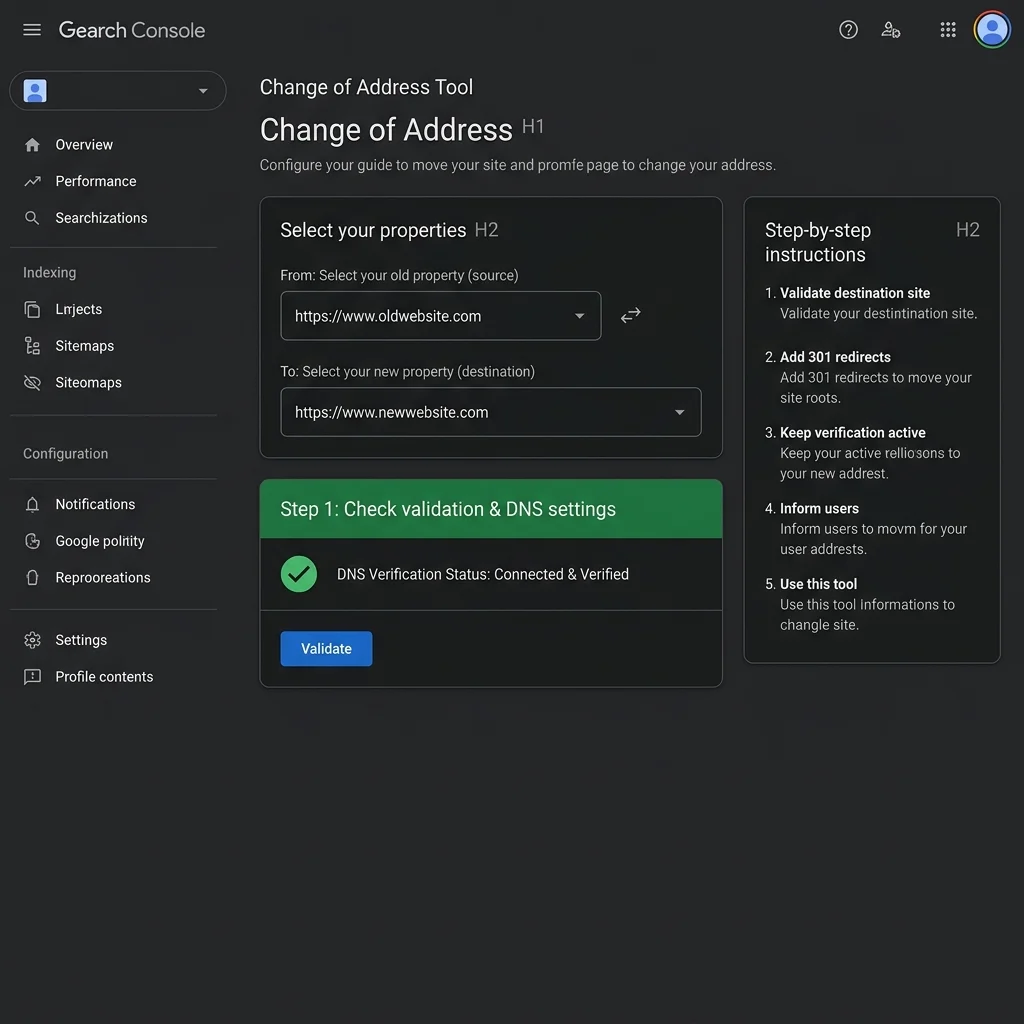
| LD-05 | Submit Change of Address in GSC | GSC Tool Panel | GSC Settings Console verification | [ ] |
| LD-06 | Deploy New XML Sitemaps | XML Sitemap Index | Submit index sitemap URL to GSC | [ ] |
Step-by-Step Launch Day Tasks
#### 1. DNS Record Configuration Update your DNS records to point to your new servers. Make sure you set a low Time-To-Live (TTL) (e.g., 300 seconds) a few days before launch to speed up propagation across the web.
#### 2. Remove Staging Protection
- →Disable HTTP Authentication on your production servers.
- →Verify that staging robots.txt configurations have been replaced with the production version.
- →Remove any temporary
noindexdirectives from your pages.
# Verify headers on live production URLs using curl
curl -I https://www.seotech.app/blog/website-migration-seo-checklist
Ensure the server returns a 200 OK status and check that the headers do not contain x-robots-tag: noindex.
#### 3. Deploy and Test Redirects
- →Activate your 301 redirect engine.
- →Test a sample of your redirect map using a terminal script or Screaming Frog's list mode to verify they return a
301 Moved Permanentlystatus.
#### 5. Submit New XML Sitemaps
- →Generate the new XML sitemaps containing only your new canonical URLs.
- →Submit the new sitemap index URL to GSC.
- →Keep your old sitemaps active on their old URLs for a few weeks to help search engines crawl the redirects.
8. Post-Launch Monitoring Checklist
Monitoring the site in the weeks following the migration is essential for catching and addressing indexing issues early.
Post-Launch Monitoring Table
| Metric / Check | Frequency | Recommended Tool | Normal Range / Threshold | Action If Triggered |
|---|---|---|---|---|
| 404 Server Errors | Daily (First 14 days) | Google Search Console / Log Analyzer | < 0.5% of crawled pages | Check logs for broken links or missing redirect rules |
| Crawl Rate Limit Drop | Daily | Google Search Console Crawl Stats | Flat or slight bump during transition | Check response times for server 5xx or server load |
| Organic Impressions | Weekly | GSC Performance Report | ±10% variation from baseline | Segment data by folder to isolate specific traffic loss |
| Average Load Time | Weekly | PageSpeed Insights API | LCP < 2.5s (Green Core Web Vitals) | Profile bundles, review server response times, optimize CSS |
| Indexation Status | Weekly | Google Search Console Page Indexing | "Page with redirect" matches old page volume | Run bulk URL inspection using API to check reindexing |
Immediate Post-Launch Audits
#### Real-Time Log File Audits Analyze server log files daily to monitor search crawler activity. Look for:
- →Googlebot accessing old URLs and receiving
301status codes. - →Googlebot accessing new URLs and receiving
200status codes. - →Any increases in
500 Internal Server Errorsor404 Not Founderrors.
- →Broken redirects (returning 4xx or 5xx codes).
- →Redirect chains or loops.
- →Canonical tag inconsistencies on target URLs.
9. Google Search Console Validation
Google Search Console is key for tracking how Google is indexing the migrated site.
- →Check Sitemap Processing: Verify that Google has processed your new XML sitemaps and shows no parsing errors.
- →Monitor Indexing Reports: Watch the Page Indexing report under GSC. You should see a gradual transfer of pages from the old property to the new one.
- →Inspect Crawl Stats: Review the Crawl Stats report under Settings to check for increases in connection timeouts or server errors.
- →Use the GSC API: For large websites, use the GSC API to programmatically inspect migrated URLs and confirm they are canonicalized and indexed correctly.
# Example Python command to fetch GSC search console URL inspection data
python -c "import google_auth_oauthlib; print('GSC API access initiated')"
10. GA4 Validation Checklist
Verify that your analytics setup is tracking traffic correctly on the new site:
- →Confirm Data Streams: Ensure the GA4 property is receiving data from your new domain or CMS.
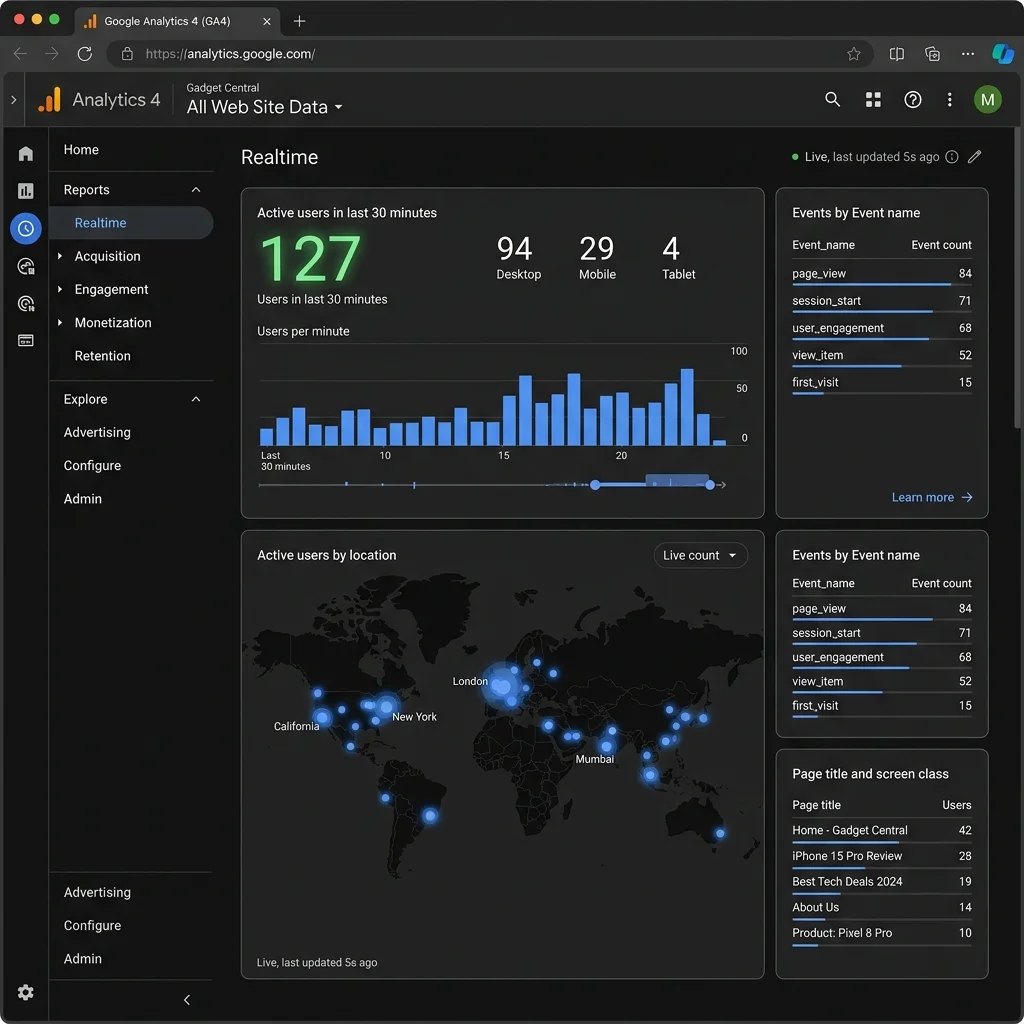
- →Check Real-Time Tracking: Use the GA4 Real-time report to confirm user activity is being tracked.
- →Validate Cross-Domain Settings: If you are migrating across domains, set up cross-domain tracking in GA4 to preserve user session data.
- →Verify Key Conversion Events: Perform test purchases or form submissions to check that conversion events are triggering correctly.
11. Common Website Migration Mistakes
Avoid these common migration errors to prevent ranking drops:
1. Releasing a Staging robots.txt disallow File
Developers often useDisallow: / in their staging robots.txt to keep it private, then push it to production by mistake. This blocks search engines from crawling the entire site. Always verify the live robots.txt immediately after deployment.
2. Redirecting Everything to the Homepage
Using wildcards to redirect all old URLs to the homepage is a common mistake. Google treats homepage redirects for specific content pages as Soft 404s, which will hurt your page authority and organic rankings.3. Leaving Broken Canonical Tags
If your canonical tags still point to your old URLs or staging subdomains, search engines will struggle to index the new pages correctly. Ensure canonical tags dynamically update to point to the new production URLs.4. Poor Site Performance
Migrating to a heavier CMS or adding unoptimized scripts can slow down page load times. Slow sites can see crawl budget reductions and lower rankings. Always monitor your Core Web Vitals performance post-launch.12. Recovery Plan If Rankings Drop
If your search rankings drop after a migration, follow this diagnostic process to find and fix the issue.
flowchart TD
    A[Identify Traffic Drop] --> B[Check Indexation Status in GSC]
    B --> C{Are URLs indexed?}
    C -- No --> D[Check robots.txt, Canonical Tags & Noindex Directives]
    C -- Yes --> E[Check Redirect Paths & Internal Links]
    D --> F[Fix Blockers / Meta Tags]
    E --> G{Are redirects returning 301?}
    G -- No --> H[Fix Status Codes on Server]
    G -- Yes --> I[Audit Page Content & Internal Anchor Links]
1. Run a Comparison Crawl
Crawl your old URLs again and compare the status codes with your redirect map. Look for:- →Dropped redirects.
- →URLs returning
404or500status codes. - →Redirects pointing to irrelevant pages.
2. Verify Canonical Tags and Directives
Check a sample of pages to ensure they don't have:- →Accidental
noindexdirectives. - →Incorrect canonical URLs.
- →Blocked resource directories in
robots.txt.
3. Check for Content Loss
Compare the content of your high-performing pages before and after the migration. Check for:- →Missing text or image assets.
- →Changes in heading hierarchies (H1–H3).
- →Missing title tags or meta descriptions.
13. Complete Printable Migration Checklist
Use this checklist to track your tasks through each phase of the migration.
Pre-Migration Phase
- Crawl the legacy site to document status codes, metadata, and canonical tags.
- Export all legacy URLs from sitemaps, analytics, and GSC data.
- Pull legacy backlink reports from Ahrefs or GSC.
- Benchmark keyword rankings and organic traffic.
- Set up GSC properties for the new domain (if applicable).
- Create a 1-to-1 redirect mapping sheet for all indexable URLs.
Staging Verification Phase
- Validate 301 redirect rules in a staging environment.
- Crawl staging to check for broken links and correct canonical tags.
- Verify that staging forms, checkout flows, and analytics tags function properly.
- Check schema markup using the Rich Results Test tool.
- Ensure staging is password-protected or IP-restricted.
Launch Day Phase
- Update DNS records with low TTL settings.
- Remove staging access restrictions (HTTP auth, noindex tags).
- Activate 301 redirect rules on your production servers.
- Verify robots.txt allows search crawlers and points to the new sitemap.
- Submit a Change of Address in Google Search Console (for domain moves).
- Submit the new XML sitemap index to GSC.
- Test analytics tags using GA4 Realtime monitoring.
Post-Launch Phase
- Crawl old URLs to confirm they redirect to new destinations.
- Monitor server logs for crawl activity and status code errors.
- Watch the GSC Page Indexing report for re-indexing progress.
- Audit new production page performance using PageSpeed Insights.
- Track organic traffic, conversions, and keyword rankings against your baseline.
14. Article & Breadcrumb Schema JSON-LD
Article Schema JSON-LD
{
  "@context": "https://schema.org",
  "@type": "Article",
  "headline": "Website Migration SEO Checklist: Preserve Rankings During Domain, CMS, or URL Changes (2026)",
  "description": "An expert-grade website migration SEO checklist and technical roadmap. Learn redirect mapping, GSC validation, and post-launch troubleshooting to protect organic rankings.",
  "image": "https://www.seotech.app/images/blog/website-migration.webp",
  "datePublished": "2026-06-18T09:00:00Z",
  "dateModified": "2026-06-18T10:00:00Z",
  "author": {
    "@type": "Person",
    "name": "Daniel Ashcroft",
    "url": "https://www.seotech.app/authors/daniel-ashcroft"
  },
  "publisher": {
    "@type": "Organization",
    "name": "TechSEO Insights",
    "logo": {
      "@type": "ImageObject",
      "url": "https://www.seotech.app/images/logos/logo.svg"
    }
  },
  "mainEntityOfPage": {
    "@type": "WebPage",
    "@id": "https://www.seotech.app/blog/website-migration-seo-checklist"
  },
  "articleSection": "SEO",
  "keywords": "website migration seo checklist, seo migration checklist, website migration seo, domain migration seo"
}
Breadcrumb Schema JSON-LD
{
  "@context": "https://schema.org",
  "@type": "BreadcrumbList",
  "itemListElement": [
    {
      "@type": "ListItem",
      "position": 1,
      "name": "Home",
      "item": "https://www.seotech.app"
    },
    {
      "@type": "ListItem",
      "position": 2,
      "name": "Blog",
      "item": "https://www.seotech.app/blog"
    },
    {
      "@type": "ListItem",
      "position": 3,
      "name": "Website Migration SEO Checklist",
      "item": "https://www.seotech.app/blog/website-migration-seo-checklist"
    }
  ]
}
15. References
Advertisement
Frequently Asked Questions
How long does a website migration take to recover rankings?
For a clean migration with a solid redirect mapping strategy and no major structural changes, search engines typically process the move within 2 to 6 weeks. However, highly complex domain or brand migrations can see minor ranking fluctuations for up to 3 months.
Can I combine a website redesign with a CMS migration?
While it is possible, combining a redesign and a CMS migration increases risk because debugging ranking drops becomes harder. If traffic drops, it is difficult to isolate whether the issue lies with the CMS structure, CSS layout shifts, content loss, or internal linking changes.
What is the most critical step in a website migration?
The redirect mapping strategy. Creating 1-to-1 permanent 301 redirects from every legacy indexable URL to its modern equivalent is essential for preserving link equity, crawling efficiency, and user experience.

Technical SEO Specialist & Web Performance Engineer
Daniel Ashcroft is a Technical SEO Specialist with 9+ years of experience optimizing enterprise web applications for search performance. He specializes in Next.js architecture, Core Web Vitals, and technical SEO implementations that bridge development and marketing. He has led SEO migrations for Fortune 500 companies, managed crawl optimization for million-page sites, and built automated auditing tools used by agencies worldwide. Daniel has helped clients achieve 40%+ organic traffic improvements through JavaScript SEO, server-side rendering, and performance optimization. He is a regular speaker at BrightonSEO, SMX, and SearchLove, contributing to publications including Search Engine Land and Moz Blog. Daniel is committed to making the web faster, more accessible, and more discoverable through technical excellence.
Stay Updated
Get the latest articles and SEO insights delivered to your inbox.
No spam. Unsubscribe anytime.



Advertisement