Content Audit Framework: Find, Improve, Merge, or Remove Pages (2026)
Enterprise content audit framework. Learn how to inventory your pages, apply a point-based scoring system, and run Keep, Improve, Merge, or Remove workflows.

Advertisement
Key Takeaways
- Content audits simplify site architecture, allowing search engines to crawl and rank your high-value pages.
- Apply a point-based scoring system across organic sessions, backlink profiles, engagement metrics, and conversion rates.
- Consolidate underperforming articles on similar topics into a single comprehensive guide and redirect the old URLs.
- Review indexing rates in Search Console after auditing to confirm search engine bots crawl your remaining pages.
In content marketing, more is not always better. As websites grow, they often accumulate thin, duplicate, or outdated pages. This accumulation can lead to content sprawl, which splits your link authority, generates duplicate content issues, and drains your crawl budget.
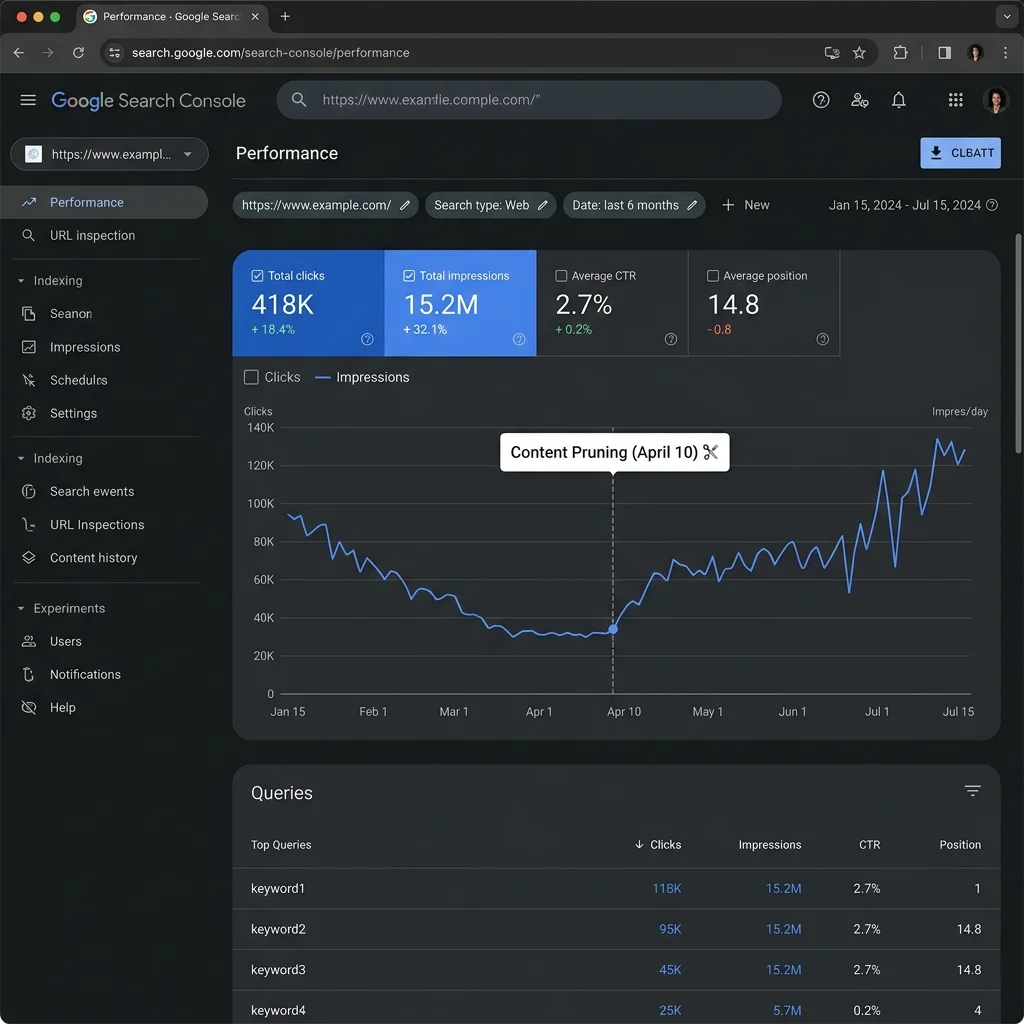
Enterprise sites that regularly audit their content libraries often see traffic gains by reducing their page counts. For example, pruning 30% of underperforming pages can lead to a significant increase in sitewide organic traffic. By consolidating thin articles, you send stronger quality signals to search engines.
This guide outlines an enterprise content audit framework. We will cover how to build a content inventory, outline a points-based page scoring system, provide a decision matrix, and share a Python script to automate your audit workflow.
[!NOTE] A successful content audit depends on clean site crawl data. To verify your page URLs, use this guide alongside our Technical SEO Audit Checklist and Log File Analysis for SEO.
1. What Is a Content Audit?
A content audit is the process of inventorying all indexable pages on a website and analyzing their performance metrics. The goal is to evaluate each page and assign it to one of four actions:
- Keep: Maintain the page as-is, focusing on ongoing optimization and link acquisition.
- Improve: Update, expand, or optimize the page to recover lost traffic or target rankings.
- Merge (Consolidate): Combine multiple thin pages covering similar topics into a single comprehensive guide.
- Remove (Prune): Delete outdated, low-performing pages that offer no search value, returning a
410 Gonestatus code.
2. Why Run a Content Audit?
Auditing and pruning underperforming content provides several benefits:
Improved Crawl Efficiency
Search engine spiders have limited resources. By removing low-value page variations, you ensure crawlers focus their crawl budget on your core revenue pages. To learn more about crawler management, refer to our Crawl Budget Optimization Guide.Consolidated Page Authority
Instead of having multiple thin pages compete for the same keywords (keyword cannibalization), you can merge them into a single high-authority guide that ranks better.Enhanced User Experience
Removing outdated content ensures users only find accurate, high-quality information, which can improve engagement metrics like average session duration.Data-Driven Planning
An audit helps you identify which content formats, topics, and templates perform best, allowing you to prioritize future content creation.3. Gathering Content Inventory Data
To begin your audit, build a master spreadsheet containing all indexable URLs on your site. You will need to pull data from several sources:
- →Crawl Database: Crawl your live site using Screaming Frog to extract indexable canonical URLs.
- →Google Analytics 4: Export organic landing page sessions, conversion counts, and average engagement times for the past 12 months. Refer to our Google Analytics 4 Guide to configure GA4 streams.
- →Google Search Console: Pull impression volumes, click counts, click-through rates (CTR), and average positions for each URL.
- →Backlink Tools: Export referring domain counts and page authority scores using tools like Ahrefs, Semrush, or Majestic.
How to Merge Data in Excel (XLOOKUP Guide)
Once you have exported CSV files from Screaming Frog, GSC, and GA4, you must consolidate them into a single sheet. Assuming your Screaming Frog crawl is your master list in Sheet 1:- Create a column named GA4 Sessions in Sheet 1.
- Enter the following formula in row 2 to pull session data from Sheet 2 (your GA4 export):
=XLOOKUP(A2, 'GA4 Export'!$A$2:$A$5000, 'GA4 Export'!$B$2:$B$5000, 0)Where A2 is the URL cell in your master sheet, column A in the GA4 sheet contains the page paths, and column B contains the sessions.
- Repeat this process for GSC clicks, impressions, and referring domains from Ahrefs to construct your complete database.
Screaming Frog Custom Extractions
When crawling your site, configure Screaming Frog to extract specific page attributes to help assess content quality:- →H1 Header Count: Ensure each page has exactly one H1 header.
- →Word Count: Identify short, thin pages (e.g., articles under 400 words) that may be candidates for pruning.
- →Publication Date: Extract author names or publication dates to target older content.
- →Outbound Links: Track outbound link counts to help identify link decay and rot.
4. Qualitative Audit Dimensions
While metrics like clicks and sessions are critical, you must also evaluate pages qualitatively. A page with low traffic may be highly valuable to users during the checkout process. Inspect pages for these criteria:- →Accuracy and Relevance: Is the advice current? Are product features or pricing updated?
- →Spelling and Grammar: Does the text contain errors that hurt trust?
- →Visual Presentation: Are screenshots clear? Do layouts render correctly on mobile viewports?
- →Helpfulness (E-E-A-T): Does the author share personal experience or proprietary statistics?
- →Visual Elements: Are key lists, checklists, or data tables formatted clearly?
5. The Page Scoring Framework
To evaluate pages objectively, apply a point-based scoring system across four key metrics:
Page Scoring System Table
| Metric Category | Scoring Condition | Points Added / Deducted | SEO Context |
|---|---|---|---|
| Organic Traffic | > 1,000 monthly sessions | +3 points | Strong traffic contribution |
| Organic Traffic | 100 - 1,000 monthly sessions | +1 point | Moderate traffic contribution |
| Organic Traffic | < 10 monthly sessions | -2 points | Low-performing page |
| Backlink Equity | Referring Domains > 10 | +3 points | Strong authority contribution |
| Backlink Equity | Referring Domains 1 - 10 | +1 point | Moderate authority |
| Backlink Equity | Referring Domains = 0 | -1 point | No external equity |
| User Engagement | Avg Engagement Time > 2 mins | +2 points | High qualitative value |
| User Engagement | Avg Engagement Time < 30 secs | -2 points | Thin or unhelpful content |
$$\text{Page Score} = \text{Traffic Points} + \text{Equity Points} + \text{Engagement Points}$$
- →High Performers (Score > 5): Assign to Keep.
- →Optimization Candidates (Score 2 to 5): Assign to Improve.
- →Consolidation Candidates (Score -2 to 1): Assign to Merge.
- →Pruning Candidates (Score < -2): Assign to Remove.
6. Automating Scoring in Spreadsheets
If you prefer using spreadsheets instead of Python scripts, you can write nested formulas to automate your categorization.Assuming your calculated total page score is located in column E (starting at row 2):
- In your master sheet, create a column named Audit Action.
- Enter the following formula in cell
F2:
=IFS(E2>5, "Keep", E2>=2, "Improve", E2>=-2, "Merge", TRUE, "Remove")This nested IFS statement reads your total score and automatically categorizes the page, allowing you to filter your sheet by target actions.
7. Managing "Content Zombies"
"Content Zombies" are pages on your site that are technically indexable but receive zero search traffic, conversions, or user interaction. They are "dead pages" that remain active in your directory.A high ratio of dead pages to helpful pages can dilute your sitewide quality signals. Google’s helpful content algorithms evaluate site quality across your entire domain. Leaving thousands of unhelpful pages active can limit the ranking potential of your high-performing pages. Auditing and pruning these "zombie" pages is key to maintaining search visibility.
8. The Content Audit Decision Matrix
Use this matrix to categorize pages based on GSC and GA4 metrics:
Decision Matrix Table
| GSC Impressions | GA4 Sessions | Backlink Count | Conversion Rate | Suggested Action | SEO Strategy |
|---|---|---|---|---|---|
| High | High | High | High | Keep | Retain as core asset, monitor competitors, add internal links |
| High | Low | Medium | Low | Improve | Optimize copy, rewrite title hooks, align search intent |
| Low | Low | High | Low | Merge | Consolidate with a higher-ranking page, 301 redirect |
| Low | Near Zero | Zero | Zero | Remove | Delete page, return 410 Gone status code |
9. Python Script for Automated Content Auditing
If you manage a large website, you can automate your page scoring using this Python script:
# content_audit.py
import pandas as pd

# Load your merged audit dataset
# Expected CSV columns: 'url', 'sessions', 'referring_domains', 'engagement_time_sec'
def run_content_audit(csv_path):
    try:
        df = pd.read_csv(csv_path)

        # Calculate Traffic Points
        def get_traffic_points(sessions):
            if sessions > 1000: return 3
            elif sessions >= 100: return 1
            else: return -2

        # Calculate Equity Points
        def get_equity_points(domains):
            if domains > 10: return 3
            elif domains >= 1: return 1
            else: return -1

        # Calculate Engagement Points
        def get_engagement_points(time_sec):
            if time_sec > 120: return 2
            elif time_sec < 30: return -2
            else: return 0

        df['traffic_points'] = df['sessions'].apply(get_traffic_points)
        df['equity_points'] = df['referring_domains'].apply(get_equity_points)
        df['engagement_points'] = df['engagement_time_sec'].apply(get_engagement_points)

        # Calculate total page score
        df['page_score'] = df['traffic_points'] + df['equity_points'] + df['engagement_points']

        # Assign audit actions
        def assign_action(score):
            if score > 5: return 'Keep'
            elif score >= 2: return 'Improve'
            elif score >= -2: return 'Merge'
            else: return 'Remove'

        df['audit_action'] = df['page_score'].apply(assign_action)

        print("Audit action distribution counts:")
        print(df['audit_action'].value_counts())

        # Save audited output sheet
        df.to_csv('audit_recommendations.csv', index=False)
        print("Exported audit results to audit_recommendations.csv")

    except Exception as e:
        print(f"Error running content audit: {e}")

if __name__ == '__main__':
    run_content_audit('raw_content_inventory.csv')
10. Case Study: E-Commerce Content Consolidation
An e-commerce retailer selling activewear noticed declining rankings for their main category page. An audit revealed they had published 14 separate blog articles covering "hiking shoe tips", "best shoes for walking", and "waterproof trail runners".All 14 posts were thin, competing with each other for similar keywords.
- →Action: The team merged the content of these 14 articles into a single, comprehensive 4,500-word guide titled "Trail Running and Hiking Shoes: The Complete Fit & Selection Guide".
- →Redirects: The team implemented 301 redirects from the 14 old URLs to the new guide.
- →Outcome: Within 6 weeks, the consolidated guide ranked in the top 3 spots for all target queries, and total organic search clicks to that topic folder rose by 74%.
11. Auditing Multi-lingual and International Sites
For websites using international subfolders (e.g.,/es/, /fr/, /de/) or subdomains, content audits carry additional considerations:
- →Hreflang Integrity: Ensure that if you delete or merge a page, you update the corresponding
hreflangtags on the alternate language versions. Failing to do so can result in hreflang errors and crawling inefficiencies. - →Localized Search Intent: Evaluate query performance per language folder. A template that ranks well in the US market may require localized updates to match search intent in France or Germany.
- →Regional Data Exports: Export GA4 and GSC metrics filtered by country. A page with low global traffic may have high regional conversions that justify keeping it.
12. Step-by-Step Content Audit Process
Content Audit Checklist Table
| Audit Phase | Operational Task | Primary Tool | Target Outcome |
|---|---|---|---|
| Phase 1: Inventory | Crawl site & extract all active URLs | Screaming Frog | Master list of all URLs |
| Phase 2: Data Merging | Export GA4, GSC, and Backlink data | GA4 / GSC / Ahrefs | Single data sheet with merged metrics |
| Phase 3: Scoring | Calculate page scores based on metrics | Excel / Python | Page score database |
| Phase 4: Decisioning | Classify pages into Keep, Improve, Merge, Remove | Decision Matrix | Action plan roadmap |
| Phase 5: Implementation | Execute redirects, rewrites, and pruning | CMS / Nginx | Cleaner index, optimized crawl budget |
13. Managing Audit Actions
1. The Keep Workflow
For high-performing pages, focus on maintaining their rankings. Regularly monitor competitor updates, add internal links from newer related posts, and ensure their mobile experience is optimized.2. The Improve Workflow
For pages with good impressions but low traffic, focus on optimization:- →Check if search intent has changed.
- →Add new sections, updated statistics, or interactive elements. If you use AI to support content writing, follow our AI SEO Content Writing Guide to ensure your updates are high-quality.
- →Optimize your headings, titles, and descriptions.
3. The Merge Workflow
If you have multiple thin pages covering similar topics (e.g., three separate short posts on "React routing tips"):- →Select the page with the highest authority or traffic as the final target URL.
- →Combine the unique value of the other pages into the target page.
- →Set up permanent 301 redirects from the merged URLs to the target URL. Review our Website Migration SEO Checklist to manage redirects cleanly.
4. The Remove Workflow
If a page is outdated and receives no traffic or backlinks:- →Delete the page from your CMS.
- →Ensure the server returns a
410 Gonestatus code instead of a standard 404, prompting search engines to remove the URL from their index quickly. - →Remove all internal links pointing to the deleted page to prevent crawl errors.
14. Launching and Monitoring post-Audit Changes
After implementing your audit actions, monitor your site's indexing health in Google Search Console:
- →Check Indexing Reports: You should see a gradual drop in indexed pages as thin URLs are removed or redirected, alongside improvements in average ranking positions for your core pages.
- →Track Crawl Budgets: Watch for changes in crawler activity. Deleting thin content should allow Googlebot to crawl your core indexable URLs more frequently.
- →Monitor Page Performance: Ensure updated templates maintain fast response times. For Next.js setups, review our Next.js SEO Guide for optimization tips.
15. References
Advertisement
Frequently Asked Questions
What is a content audit?
A content audit is a process that inventories all indexable pages on a website, analyzes their traffic and performance metrics, and categorizes them into actionable items (Keep, Improve, Merge, or Remove).
How often should I run a content audit?
Conduct a comprehensive website content audit annually for medium-to-large sites (over 10,000 URLs), while running micro-audits quarterly on specific subfolders or categories that show traffic declines.
What should I do with pages that have backlinks but no traffic?
Do not delete pages that have accumulated authority backlinks, as you will lose that link equity. Instead, merge the page into a related high-performing guide and implement a 301 redirect.

Content Marketing Strategist & SEO Writer
Hannah Blake is a Content Marketing Strategist with 7+ years of experience driving organic growth for SaaS and e-commerce brands. She combines journalistic storytelling with data-driven SEO to create content that ranks, converts, and builds authority. Hannah has developed content strategies that generated over 2 million organic sessions annually for B2B technology companies, and her writing has been featured in Forbes, Entrepreneur, and Search Engine Journal. She specializes in topic cluster modeling, search intent analysis, content gap analysis, and conversion-focused content optimization. Hannah holds a degree in Journalism from the University of Cambridge and is certified in Google Analytics 4 and HubSpot Content Marketing. She regularly teaches workshops on content strategy and SEO writing for emerging marketers.
Stay Updated
Get the latest articles and SEO insights delivered to your inbox.
No spam. Unsubscribe anytime.

Advertisement