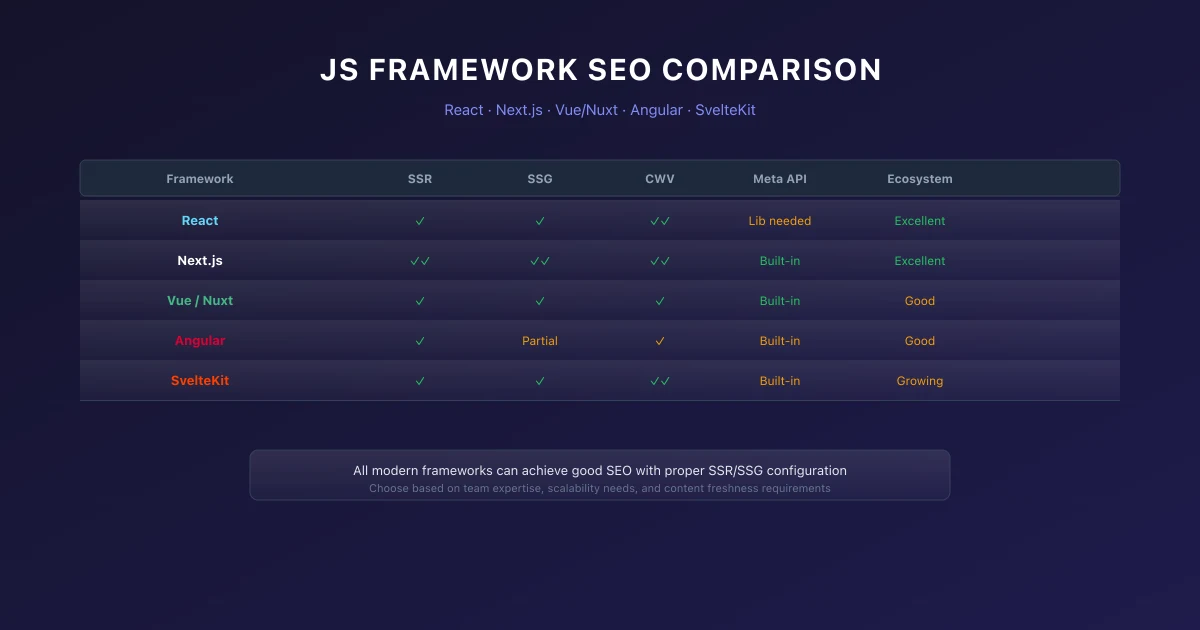
Next.js SEO Guide: Best Practices for App Router & Metadata (2026)
Learn how to optimize Next.js applications for search engine rankings in 2026. Covers App Router metadata, dynamic sitemaps, and Core Web Vitals optimization.

Key Takeaways
- Next.js App Router Metadata API automatically handles canonical tags, Open Graph, and Twitter metadata generation.
- Use dynamic sitemap generation via sitemap.ts to keep search engines updated on new URLs programmatically.
- Leverage React Server Components (RSC) to render HTML on the server, minimizing client-side JavaScript bundle sizes.
Next.js has become one of the most popular frameworks for link building strategies in modern web applications. Its hybrid React Server Components rendering capabilities allow you to choose between static generation, server-side rendering, and incremental static regeneration based on your content marketing strategy framework needs.
1. Server-Side Rendering vs Static Generation
Understanding when to use each rendering method is crucial for SEO success. Static generation produces HTML at build time, delivering the fastest possible load times. Server-side rendering generates HTML on each request, ensuring AI content writing content is always current.
App Router Metadata API
Next.js performance optimization introduced a powerful Metadata API for managing SEO metadata. You can export metadata objects from page and layout files, dynamically generate metadata based on route parameters, and manage Open Graph and Twitter Card content data analytics centrally.
Dynamic Sitemaps
Programmatic sitemap generation ensures search engines (like those optimized in Progressive Web Apps SEO) can discover all your video SEO strategy. Use the sitemap.ts file convention to generate XML sitemaps guide that include all your topic clusters and pillar pages, blog posts, categories, and tags.
2. Performance Optimization
Performance directly impacts SEO through Core Web Vitals guide. Next.js provides built-in image optimization through the image SEO optimization component, automatic code splitting, and route prefetching for instant page transitions.
Image Component
The Next.js Image component automatically optimizes images, serves next-gen formats (as described in our robots.txt best practices), and implements lazy loading. Use it for all images to improve LCP scores and reduce bandwidth usage.
Font Optimization
Next.js integrates with next/font to optimize font loading. It automatically self-hosts Google Fonts, subsets them, and applies font-display ecommerce SEO strategies to prevent layout shifts.
3. Structured Data Implementation
Implement JSON-LD structured data markup in your Next.js pages using script tags with dangerouslySetInnerHTML. Create SEO-friendly content templates for generating schema markup for articles, breadcrumbs, FAQs, and organization information.
4. Conclusion
Next.js provides all the tools needed for excellent SEO. By combining proper metadata, optimized web performance optimization techniques, and structured data, you can build applications that rank well and provide great user behavior analytics experiences.
5. Next.js Static Metadata Configuration
import type { Metadata } from 'next';

export const metadata: Metadata = {
  title: 'Optimized Page Title',
  description: 'SEO Friendly page meta description.',
  alternates: {
    canonical: 'https://technical-seo.pages.dev/blog/nextjs-seo-best-practices',
  },
};
6. Common Mistakes
- →Blocking JavaScript & CSS in robots.txt: Googlebot needs to render layout styles to calculate Core Web Vitals like CLS and LCP accurately.
- →Not Preloading Critical Hero Images: Forgetting to preload the LCP image delays rendering, resulting in a poor Lighthouse speed score.
- →Ignoring Client-Side Render Latency: Relying entirely on client-side JS executing without an HTML backup blocks indexation on other search engines like Bing.
7. Next.js SEO Optimization Checklist
- Configure Metadata Objects: Implement dynamic metadata using
generateMetadatafor pages. - Optimize Images: Replace standard
<img>tags withnext/imageto prevent CLS. - Confirm Canonical Links: Use the metadata configuration to define self-referential canonical URLs.
- Manage Script Loading: Use
next/scriptwith appropriate strategies for third-party scripts.
8. When This Does Not Apply
- →Static Marketing Pages: Simple, light static sites with minimal dynamic elements rarely need complex server-rendering, database connections, or API performance strategies.
- →Non-Indexed Portals: Staging sites, dashboard pages behind authentication, or internal company wikis do not benefit from structured data or search engine indexability optimization.
9. Official References
Frequently Asked Questions
How does Next.js App Router handle SEO metadata?
Next.js App Router features a built-in Metadata API. By exporting a static metadata object or a generateMetadata function, Next.js handles title, description, and canonical tags, rendering them server-side.
How do I generate dynamic sitemaps in Next.js?
Create a sitemap.ts file in your app directory that exports a default function returning an array of routes. Next.js dynamically renders the XML sitemap when crawlers request it.
Are React Server Components good for SEO?
Yes. RSCs render on the server, which means the browser (and search engine crawlers) receives fully rendered HTML directly, drastically reducing JS execution overhead and improving Core Web Vitals.

Founder & Editor, TechSEO Insights
Mehul Makavana writes practical SEO, AI tools, and web development guides based on hands-on research, testing, and real website optimization work.
Stay Updated
Get the latest articles and SEO insights delivered to your inbox.
Privacy Note: By subscribing, you agree to receive our newsletter (Lawful Basis: Consent). We retain your email address until you choose to unsubscribe. For more details, view our Privacy Policy.