Site Architecture for SEO: Building a Search-Friendly Structure
Design a site architecture that maximizes crawl efficiency, distributes link equity, and helps users and search engines find your most important content.
Advertisement
Key Takeaways
- Flat architecture helps search engines reach deep content in fewer clicks
- Silo structure groups related content to build topical authority
- URL structure should reflect content hierarchy
- Breadcrumbs improve navigation and create internal links
- The 3-click rule is a guideline, not a ranking factor
- Regular architecture audits prevent crawl waste and orphan pages
Site architecture is the structural foundation of your SEO strategy. How you organize pages, connect them through internal links, and structure your URL hierarchy determines how much of your site gets crawled, how link equity flows, and which pages rank.
A well-designed site architecture benefits both users and search engines. Users find what they need quickly. Search engines crawl efficiently and understand content relationships. The result is better rankings across your entire site.
Flat vs Deep Architecture
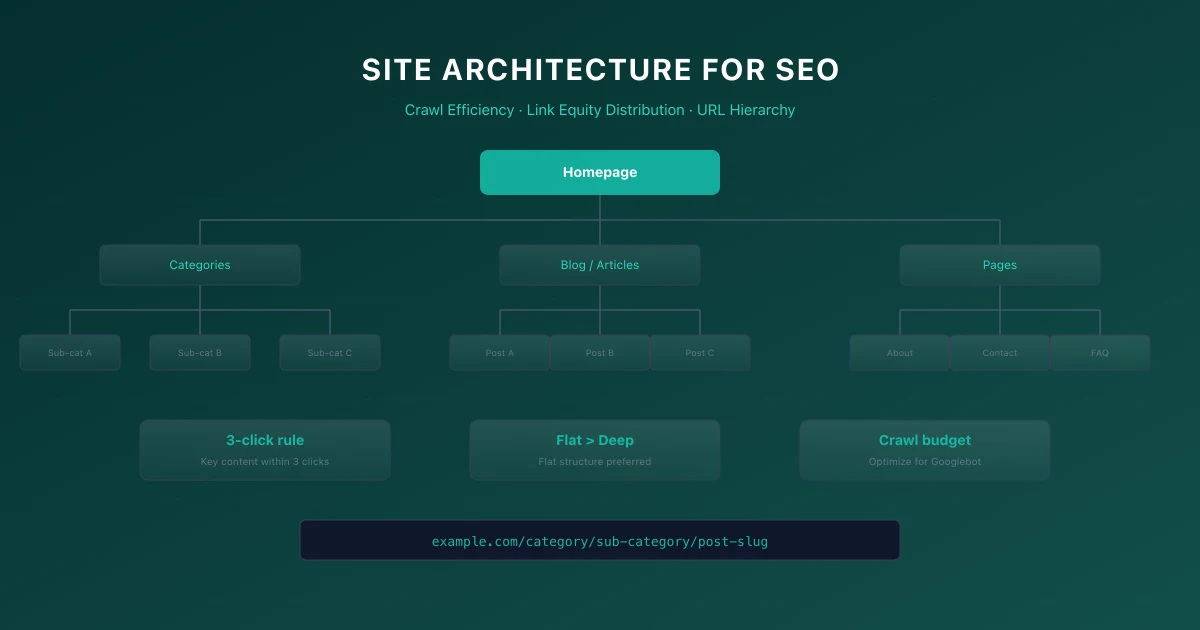
Site architecture exists on a spectrum from flat to deep. Flat architecture means most pages are reachable within a few clicks from the homepage. Deep architecture requires many clicks to reach some pages.
Flat architecture is generally better for SEO. Pages only a few clicks from the homepage receive more link equity and get crawled more frequently. A flat structure with three to four levels works well for most sites.
Deep architecture buries important content. Pages five or more clicks from the homepage may never get crawled or indexed. If Googlebot runs out of crawl budget before reaching those pages, they will not appear in search results.
Silo Structure
A silo structure groups related content into thematic sections. Each silo covers a broad topic, with subtopics organized hierarchically within the silo. This structure helps search engines understand content relationships and builds topical authority.
To implement silos, organize your site by topic rather than content type. Instead of mixing all blog posts, products, and guides together, group them by subject area. Each silo should have a pillar page that provides a comprehensive overview of the topic.
Internal links should stay within the same silo whenever possible. Link from pillar pages to subtopic pages and back. Cross-linking between silos is fine but should be less frequent than links within a silo.
URL Structure Best Practices
Your URL structure should mirror your site architecture. Clean, logical URLs help search engines understand page relationships and give users confidence before they click.
Use these URL structure guidelines:
- →Keep URLs short and descriptive
- →Use hyphens to separate words
- →Place important keywords near the beginning
- →Reflect content hierarchy in the path
- →Avoid unnecessary parameters and subdirectories
Navigation Best Practices
Navigation is the primary way both users and search engines discover your content. A well-designed navigation system makes your site architecture visible and accessible.
Primary navigation should include links to your most important pages. Limit main navigation to five to seven items. Too many choices overwhelm users and dilute link equity.
Secondary navigation like sidebar menus, footer links, and related content sections provide additional pathways through your content. Use them strategically to connect related pages.
For large sites with hundreds of pages, consider mega menus, faceted navigation, or dynamically generated related content sections. These approaches surface deep content without cluttering the main navigation.
Breadcrumbs
Breadcrumbs serve two purposes. They help users understand where they are in your site structure, and they create internal links that reinforce your architecture for search engines.
Implement breadcrumbs on every page except the homepage. Use the BreadcrumbList structured data to enable rich results in search.
Breadcrumbs should follow this pattern: Home > Category > Subcategory > Page. Each breadcrumb link should point to a real page.
Internal Linking for Architecture
Your internal linking strategy is the engine that drives your site architecture. Every internal link passes link equity and signals content relationships to search engines.
Strategic internal linking follows these principles:
- →Link from high-authority pages to pages that need ranking help
- →Use descriptive anchor text that includes target keywords
- →Link from pillar pages to cluster content and back
- →Avoid excessive links on a single page
- →Ensure every page has at least one internal link from another page on your site
The 3-Click Rule Myth
The 3-click rule states that every page should be reachable within three clicks from the homepage. This is a user experience guideline, not a Google ranking factor.
Google does not have a click-depth penalty. However, pages that require many clicks to reach often receive less link equity and may get crawled less frequently. The real issue is not clicks but the link equity required to reach deep pages.
Focus on ensuring important pages get enough internal links, rather than obsessing over an arbitrary click count.
Conducting a Site Architecture Audit
Audit your site architecture annually or after major site changes. Use crawling tools to map your site structure and identify issues.
Check for these problems:
- →Orphan pages with no internal links
- →Pages requiring more than five clicks from the homepage
- →Navigation that does not reflect content priorities
- →URL structures that do not match page hierarchy
- →Missing breadcrumbs on important pages
For performance considerations, see our Core Web Vitals guide.
Technical Implementation Steps
- Analyze Current State: Review Google Search Console crawling stats.
- Identify Errors: Filter by 4xx/5xx status codes.
- Map Redirects: Draft 301 redirects maps for any moved URLs.
- Verify Implementation: Run Lighthouse CI/Screaming Frog audit.
- Monitor GSC: Verify Google has updated the index successfully.
Common Mistakes
- →Blocking JavaScript & CSS in robots.txt: Googlebot needs to render layout styles to calculate Core Web Vitals like CLS and LCP accurately.
- →Not Preloading Critical Hero Images: Forgetting to preload the LCP image delays rendering, resulting in a poor Lighthouse speed score.
- →Ignoring Client-Side Render Latency: Relying entirely on client-side JS executing without an HTML backup blocks indexation on other search engines like Bing.
When This Does Not Apply
- →Static Marketing Pages: Simple, light static sites with minimal dynamic elements rarely need complex server-rendering, database connections, or API performance strategies.
- →Non-Indexed Portals: Staging sites, dashboard pages behind authentication, or internal company wikis do not benefit from structured data or search engine indexability optimization.
Official References
Advertisement
Frequently Asked Questions
Does site architecture directly impact rankings?
Site architecture impacts crawl efficiency, link equity distribution, and content discoverability. These factors indirectly affect rankings.
How many levels deep should my site be?
Three to four levels from the homepage works for most sites. Important content should be within two to three clicks.
Should I use subdomains or subdirectories for different content sections?
Use subdirectories. They consolidate domain authority under a single domain and are simpler to manage.
What is the best way to structure a large ecommerce site?
Use category > subcategory > product with breadcrumbs, faceted navigation with proper canonical URLs, and a robust internal linking strategy between related products.
Do breadcrumbs help with SEO?
Yes. Breadcrumbs create internal links, help search engines understand site structure, and enable rich results when marked up with structured data.

Technical SEO Specialist & Web Performance Engineer
Daniel Ashcroft is a Technical SEO Specialist with 9+ years of experience optimizing enterprise web applications for search performance. He specializes in Next.js architecture, Core Web Vitals, and technical SEO implementations that bridge development and marketing. He has led SEO migrations for Fortune 500 companies, managed crawl optimization for million-page sites, and built automated auditing tools used by agencies worldwide. Daniel has helped clients achieve 40%+ organic traffic improvements through JavaScript SEO, server-side rendering, and performance optimization. He is a regular speaker at BrightonSEO, SMX, and SearchLove, contributing to publications including Search Engine Land and Moz Blog. Daniel is committed to making the web faster, more accessible, and more discoverable through technical excellence.
Comments are temporarily unavailable.
Stay Updated
Get the latest articles and SEO insights delivered to your inbox.
No spam. Unsubscribe anytime.
Related Articles
Google AI Overviews and AI Mode SEO: A Practical Visibility Framework (2026)
An in-depth guide to achieving high visibility in Google AI Overviews and AI Mode conversational search. Learn the RAG pipeline, key ranking factors, E-E-A-T requirements, and structured data optimization.

Core Web Vitals Debugging Playbook: Diagnose and Fix LCP, INP, and CLS Issues
Stop guessing why your Core Web Vitals are failing. Learn a systematic debugging workflow for LCP, INP, and CLS issues with real diagnostic techniques, CrUX analysis, and framework-specific fixes.

Internal Linking Strategy for SEO: A Complete Framework
Build an internal linking framework that distributes link equity, establishes content relationships, and drives rankings across your entire site.
Advertisement