Content Repurposing Strategy: Get More Value From Every Asset
Learn how to extend the lifespan of your content by repurposing existing assets into multiple formats, reaching new audiences without creating from scratch.
Advertisement
Key Takeaways
- Repurposing extends content lifespan from months to years
- Different formats reach distinct audience segments with unique consumption preferences
- A single research project can produce 10 or more derivative content assets
- Repurposing is more efficient than creating from scratch because the hard work is already done
- Each format requires genuine adaptation, not a copy-paste job
- Track performance by format to understand which channels work [best](/blog/nextjs-seo-best-practices)
Content repurposing is the smartest thing you can do with your content library. You probably have dozens or hundreds of articles sitting on your site. Most of them got traffic for a few months and then faded into obscurity. That is a waste of the time, research, and expertise you invested.
The solution is not always to create more content. It is to repurpose what you already have into new formats that reach different audiences.
Why Content Repurposing Works
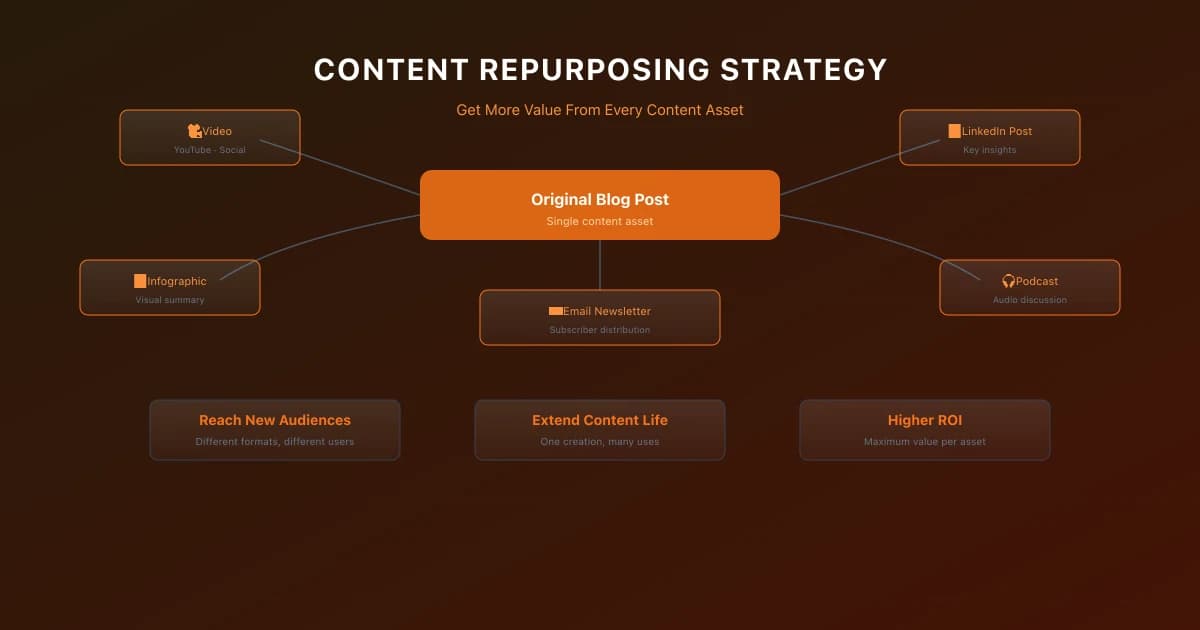
Content repurposing works because people consume information differently. Some prefer reading detailed guides. Others want to watch a video summary. Many listen to podcasts during their commute. Your blog post contains valuable information regardless of the format.
When you convert a blog post into a video, you reach the audience segment that prefers video content. When you turn a data-heavy article into an infographic, you reach visual learners. You are not duplicating content. You are adapting the same information for different consumption preferences.
This approach also reinforces your message across touchpoints. Someone who reads your blog post and later sees your LinkedIn carousel on the same topic is more likely to remember and trust your expertise.
The Efficiency Argument
Creating a new 2000-word blog post from scratch takes six to ten hours including research, writing, editing, and optimization. Repurposing that existing content into a video script takes about two hours. An infographic takes three hours. A social media thread takes one hour.
The ratio of effort to value heavily favors repurposing. The original content required the bulk of the research and expertise investment. Derivative content leverages that investment across multiple assets.
The Repurposing Framework
Identify Your Best Performers
Start with content that already works. Look for blog posts with high traffic, strong engagement, or valuable backlinks. These topics have proven demand. Repurposing them reduces risk because the topic already resonates with your audience.
Check your analytics for pages with high time on page and low bounce rates. These signals indicate readers find the content valuable. Turn these into other formats first.
Also look at content that drives conversions. A detailed product comparison post that generates leads can become a buyer guide PDF, a video walkthrough, and a comparison checklist.
Choose Your Formats
Common repurposing paths include turning blog posts into videos, creating infographics from data posts, converting webinars into blog series, expanding social media threads into guides, combining related posts into ebooks, and extracting quotes for social media.
Each format requires genuine adaptation. A video version of a blog post needs a script, visuals, and a different structure. Reading is self-paced. Video is linear. The information may be the same, but the presentation must fit the medium.
Create a Repurposing Workflow
The most efficient approach is planning for repurposing from the start. When you create a pillar piece, plan the derivative assets at the same time.
For example, when you write a comprehensive guide, plan the supporting content: a summary blog post, a video walkthrough, social media quotes, email series, and downloadable checklist. Producing all of these together is more efficient than revisiting the content months later.
Document your repurposing process. Create templates for common conversions like blog to video or report to infographic. This reduces decision fatigue and standardizes quality.
Practical Examples
Blog Post to LinkedIn Carousel
A B2B software company wrote a detailed post about their implementation methodology. They extracted the seven key steps and turned each step into a slide in a LinkedIn carousel post. The carousel received 50,000 views and generated 200 new leads. The repurposing effort took 90 minutes.
Research Report to Multiple Assets
An SEO agency published original research about Core Web Vitals adoption rates in 2026. From that single research project, they produced a detailed report PDF, 10 blog posts covering specific findings, an infographic summarizing key data, a webinar presenting the results, and social media graphics for each statistic.
The original research took three weeks. The derivative content took one additional week and generated five times the total engagement.
Webinar to Content Series
A marketing team hosted a 60-minute webinar. They recorded it and published it as a video. They transcribed it and edited it into three blog posts. They extracted key quotes for social media. They created a one-page summary PDF. The total effort for all derivative content was about four hours.
The webinar had 200 live attendees. The repurposed content reached over 10,000 people across all formats.
Tools for Content Repurposing
Several tools make repurposing more efficient. Descript handles video transcription and editing. Canva creates social media graphics and carousels. Otter.ai transcribes audio content. Lumen5 converts blog posts into video. Headliner creates audiograms from audio content.
Choose tools that match your primary formats. If you produce a lot of video, invest in video editing and transcription tools. If you produce data-heavy content, invest in data visualization tools.
Automating Your Workflow
Set up processes that streamline repurposing. For example, connect your CMS to Otter.ai for automatic transcription of uploaded video content. Use Zapier or Make to trigger repurposing workflows when content is published.
Automation handles the mechanical parts of repurposing. Your team focuses on the creative adaptation that adds value.
Measuring Repurposing Success
Track the performance of repurposed content separately from original content. Measure reach across all formats, engagement rates by format, traffic driven to your site, and leads generated from each format.
A single piece of content that performs well in multiple formats will outperform any single format version. If your repurposed video gets 10,000 views but drives only 50 visitors to your site, that may still be a success depending on the goals of that channel.
For more on building a strategy that supports repurposing, see our guide on building a data-driven content marketing strategy framework. And for understanding which content to prioritize, see our guide on data-driven content optimization.
High-Quality Content Optimization Checklist
- Verify Search Intent: Match content structure to target query type.
- E-E-A-T Assessment: Include original insights, author credentials, and fact-checked claims.
- Structured Heading Hierarchy: Use one H1, followed by H2 and H3 subsections.
- Anchor Text Relevance: Use descriptive, target-focused anchor text for internal links.
- Mobile Parity Check: Verify that mobile viewports render all key paragraphs and embeds.
Common Mistakes
- →Targeting Search Volume Over Intent: Creating high-volume informational pieces when the query has a commercial purchase intent leads to zero conversions.
- →Failing to Track Engagement Metrics: Focusing purely on organic sessions while ignoring average engagement time can hide the fact that content is thin or unhelpful.
- →Ignoring Content Decay: Publishing new posts while letting older, high-ranking pages decay without refreshes leads to a drop in overall domain visibility.
- →Publishing AI content without human editing: Raw AI output lacks personal experience and original expert points, violating search guidelines.
When This Does Not Apply
- →Breaking News Media: Real-time reporting blogs prioritizing publishing velocity do not need deep topic clusters, complex metadata, or historical updates.
- →Internal Strategy & Client Reporting: Confidential data analysis presentations or internal dashboard reports do not require public-facing metadata, indexing, or Schema markups.
Official References
Advertisement
Frequently Asked Questions
What is the difference between repurposing and duplicating content?
Repurposing adapts content for different formats and audiences. Duplicating copies content verbatim. Search engines penalize duplicate content, but repurposed content that adds genuine value in a new format is not considered duplicate.
How do I avoid cannibalizing my own content?
Different formats target different platforms and audiences. Your blog post and video version compete in different spaces. Focus each version on the strengths of its platform rather than trying to rank both for the same keywords.
What content should I repurpose first?
Start with your top-performing content. High traffic and engagement indicate strong topic demand. Repurposing proven content reduces risk because the topic resonance is already validated.
How often should I repurpose content?
Build repurposing into your regular content workflow. When you create a major piece of content, plan derivative assets at the same time. For existing content, [audit](/blog/technical-seo-audit-checklist) quarterly and identify repurposing candidates based on performance data.
Do I need different tools for each format?
Yes, but start with one format. Master video repurposing or infographic creation before expanding to multiple formats. Tool costs add up, so prioritize based on where your audience spends the most time.

Content Marketing Strategist & SEO Writer
Hannah Blake is a Content Marketing Strategist with 7+ years of experience driving organic growth for SaaS and e-commerce brands. She combines journalistic storytelling with data-driven SEO to create content that ranks, converts, and builds authority. Hannah has developed content strategies that generated over 2 million organic sessions annually for B2B technology companies, and her writing has been featured in Forbes, Entrepreneur, and Search Engine Journal. She specializes in topic cluster modeling, search intent analysis, content gap analysis, and conversion-focused content optimization. Hannah holds a degree in Journalism from the University of Cambridge and is certified in Google Analytics 4 and HubSpot Content Marketing. She regularly teaches workshops on content strategy and SEO writing for emerging marketers.
Comments are temporarily unavailable.
Stay Updated
Get the latest articles and SEO insights delivered to your inbox.
No spam. Unsubscribe anytime.
Related Articles

Google AI Overviews and AI Mode SEO: A Practical Visibility Framework (2026)
An in-depth guide to achieving high visibility in Google AI Overviews and AI Mode conversational search. Learn the RAG pipeline, key ranking factors, E-E-A-T requirements, and structured data optimization.

AI SEO Content Writing: Guide to Quality & Google E-E-A-T (2026)
How to use AI content writing tools (ChatGPT, Claude) for SEO without violating Google Helpful Content guidelines or losing E-E-A-T trust factors.

Measuring Content Marketing ROI: Metrics That Matter
Learn how to measure content marketing ROI with the right metrics, attribution models, and reporting frameworks that connect content to revenue.
Advertisement